Mocking is an essential part of unit testing, and the Mockito library makes it easy to write clean and intuitive unit tests for your Java code.
Get started with mocking and improve your application tests using our Mockito guide:
Handling concurrency in an application can be a tricky process with many potential pitfalls. A solid grasp of the fundamentals will go a long way to help minimize these issues.
Get started with understanding multi-threaded applications with our Java Concurrency guide:
Spring 5 added support for reactive programming with the Spring WebFlux module, which has been improved upon ever since. Get started with the Reactor project basics and reactive programming in Spring Boot:
Since its introduction in Java 8, the Stream API has become a staple of Java development. The basic operations like iterating, filtering, mapping sequences of elements are deceptively simple to use.
But these can also be overused and fall into some common pitfalls.
To get a better understanding on how Streams work and how to combine them with other language features, check out our guide to Java Streams:
Explore Spring Boot 3 and Spring 6 in-depth through building a full REST API with the framework:
Yes, Spring Security can be complex, from the more advanced functionality within the Core to the deep OAuth support in the framework.
I built the security material as two full courses - Core and OAuth, to get practical with these more complex scenarios. We explore when and how to use each feature and code through it on the backing project.
You can explore the course here:
Spring Data JPA is a great way to handle the complexity of JPA with the powerful simplicity of Spring Boot.
Get started with Spring Data JPA through the guided reference course:
Refactor Java code safely — and automatically — with OpenRewrite.
Refactoring big codebases by hand is slow, risky, and easy to put off. That’s where OpenRewrite comes in. The open-source framework for large-scale, automated code transformations helps teams modernize safely and consistently.
Each month, the creators and maintainers of OpenRewrite at Moderne run live, hands-on training sessions — one for newcomers and one for experienced users. You’ll see how recipes work, how to apply them across projects, and how to modernize code with confidence.
Join the next session, bring your questions, and learn how to automate the kind of work that usually eats your sprint time.
Distributed systems often come with complex challenges such as service-to-service communication, state management, asynchronous messaging, security, and more.
Dapr (Distributed Application Runtime) provides a set of APIs and building blocks to address these challenges, abstracting away infrastructure so we can focus on business logic.
In this tutorial, we'll focus on Dapr's pub/sub API for message brokering. Using its Spring Boot integration, we'll simplify the creation of a loosely coupled, portable, and easily testable pub/sub messaging system:
1. Overview
We usually deploy various applications on the same cluster of machines. For example, it’s common nowadays to have a distributed processing engine like Apache Spark or Apache Flink with distributed databases like Apache Cassandra in the same cluster.
Apache Mesos is a platform that allows effective resource sharing between such applications.
In this article, we’ll first discuss a few problems of resource allocation within applications deployed on the same cluster. Later, we’ll see how Apache Mesos provides better resource utilization between applications.
2. Sharing the Cluster
Many applications need to share a cluster. By and large, there are two common approaches:
- Partition the cluster statically and run an application on each partition
- Allocate a set of machines to an application
Although these approaches allow applications to run independently of each other, it doesn’t achieve high resource utilization.
For instance, consider an application that runs only for a short period followed by a period of inactivity. Now, since we have allocated static machines or partitions to this application, we have unutilized resources during the inactive period.
We can optimize resource utilization by reallocating free resources during the inactive period to other applications.
Apache Mesos helps with dynamic resource allocation between applications.
3. Apache Mesos
With both cluster sharing approaches we discussed above, applications are only aware of the resources of a particular partition or machine they are running. However, Apache Mesos provides an abstract view of all the resources in the cluster to applications.
As we’ll see shortly, Mesos acts as an interface between machines and applications. It provides applications with the available resources on all machines in the cluster. It frequently updates this information to include resources that are freed up by applications that have reached completion status. This allows applications to make the best decision about which task to execute on which machine.
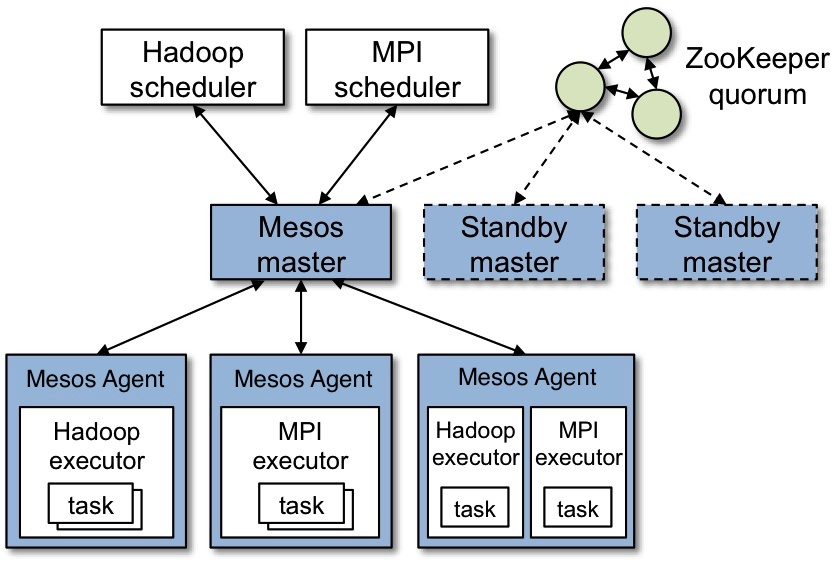
In order to understand how Mesos works, let’s have a look at its architecture:
This image is part of the official documentation for Mesos (source). Here, Hadoop and MPI are two applications that share the cluster.
We’ll talk about each component shown here in the next few sections.
3.1. Mesos Master
Master is the core component in this setup and stores the current state of resources in the cluster. Additionally, it acts as an orchestrator between the agents and the applications by passing information about things like resources and tasks.
Since any failure in master results in the loss of state about resources and tasks, we deploy it in high availability configuration. As can be seen in the diagram above, Mesos deploys standby master daemons along with one leader. These daemons rely on Zookeeper for recovering state in case of a failure.
3.2. Mesos Agents
A Mesos cluster must run an agent on every machine. These agents report their resources to the master periodically and in turn, receive tasks that an application has scheduled to run. This cycle repeats after the scheduled task is either complete or lost.
We’ll see how applications schedule and execute tasks on these agents in the following sections.
3.3. Mesos Frameworks
Mesos allows applications to implement an abstract component that interacts with the Master to receive the available resources in the cluster and moreover make scheduling decisions based on them. These components are known as frameworks.
A Mesos framework is composed of two sub-components:
- Scheduler – Enables applications to schedule tasks based on available resources on all the agents
- Executor – Runs on all agents and contains all the information necessary to execute any scheduled task on that agent
This entire process is depicted with this flow:
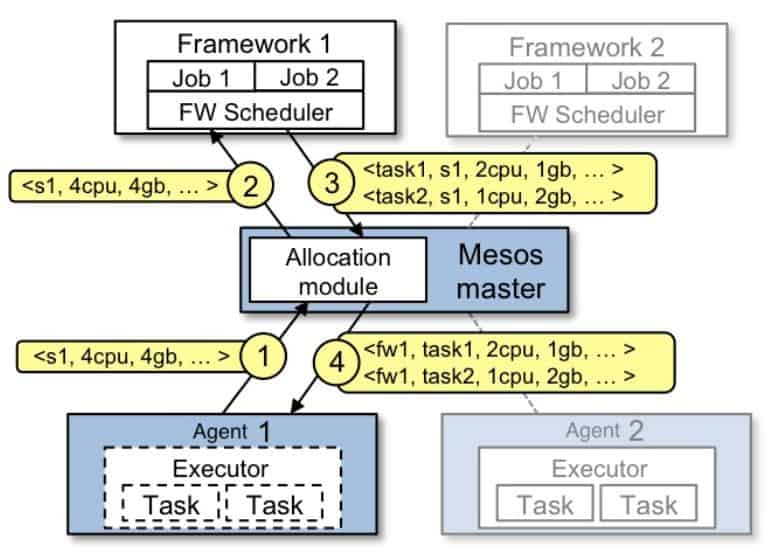
First, the agents report their resources to the master. At this instant, master offers these resources to all registered schedulers. This process is known as a resource offer, and we’ll discuss it in detail in the next section.
The scheduler then picks the best agent and executes various tasks on it through the Master. As soon as the executor completes the assigned task, agents re-publish their resources to the master. Master repeats this process of resource sharing for all frameworks in the cluster.
Mesos allows applications to implement their custom scheduler and executor in various programming languages. A Java implementation of scheduler must implement the Scheduler interface:
public class HelloWorldScheduler implements Scheduler {

    @Override
    public void registered(SchedulerDriver schedulerDriver, Protos.FrameworkID frameworkID,
      Protos.MasterInfo masterInfo) {
    }

    @Override
    public void reregistered(SchedulerDriver schedulerDriver, Protos.MasterInfo masterInfo) {
    }

    @Override
    public void resourceOffers(SchedulerDriver schedulerDriver, List<Offer> list) {
    }

    @Override
    public void offerRescinded(SchedulerDriver schedulerDriver, OfferID offerID) {
    }

    @Override
    public void statusUpdate(SchedulerDriver schedulerDriver, Protos.TaskStatus taskStatus) {
    }

    @Override
    public void frameworkMessage(SchedulerDriver schedulerDriver, Protos.ExecutorID executorID,
      Protos.SlaveID slaveID, byte[] bytes) {
    }

    @Override
    public void disconnected(SchedulerDriver schedulerDriver) {
    }

    @Override
    public void slaveLost(SchedulerDriver schedulerDriver, Protos.SlaveID slaveID) {
    }

    @Override
    public void executorLost(SchedulerDriver schedulerDriver, Protos.ExecutorID executorID,
      Protos.SlaveID slaveID, int i) {
    }

    @Override
    public void error(SchedulerDriver schedulerDriver, String s) {
    }
}
As can be seen, it mostly consists of various callback methods for communication with the master in particular.
Similarly, the implementation of an executor must implement the Executor interface:
public class HelloWorldExecutor implements Executor {
    @Override
    public void registered(ExecutorDriver driver, Protos.ExecutorInfo executorInfo,
      Protos.FrameworkInfo frameworkInfo, Protos.SlaveInfo slaveInfo) {
    }

    @Override
    public void reregistered(ExecutorDriver driver, Protos.SlaveInfo slaveInfo) {
    }

    @Override
    public void disconnected(ExecutorDriver driver) {
    }

    @Override
    public void launchTask(ExecutorDriver driver, Protos.TaskInfo task) {
    }

    @Override
    public void killTask(ExecutorDriver driver, Protos.TaskID taskId) {
    }

    @Override
    public void frameworkMessage(ExecutorDriver driver, byte[] data) {
    }

    @Override
    public void shutdown(ExecutorDriver driver) {
    }
}
We’ll see an operational version of the scheduler and executor in a later section.
4. Resource Management
4.1. Resource Offers
As we discussed earlier, agents publish their resource information to the master. In turn, the master offers these resources to the frameworks running in the cluster. This process is known as a resource offer.
A resource offer consists of two parts – resources and attributes.
Resources are used to publish hardware information of the agent machine such as memory, CPU, and disk.
There are five predefined resources for every Agent:
- cpu
- gpus
- mem
- disk
- ports
The values for these resources can be defined in one of the three types:
- Scalar – Used to represent numerical information using floating point numbers to allow fractional values such as 1.5G of memory
- Range – Used to represent a range of scalar values – for example, a port range
- Set – Used to represent multiple text values
By default, Mesos agent tries to detect these resources from the machine.
However, in some situations, we can configure custom resources on an agent. The values for such custom resources should again be in any one of the types discussed above.
For instance, we can start our agent with these resources:
--resources='cpus:24;gpus:2;mem:24576;disk:409600;ports:[21000-24000,30000-34000];bugs(debug_role):{a,b,c}'As can be seen, we’ve configured the agent with few of the predefined resources and one custom resource named bugs which is of set type.
In addition to resources, agents can publish key-value attributes to the master. These attributes act as additional metadata for the agent and help frameworks in scheduling decisions.
A useful example can be to add agents into different racks or zones and then schedule various tasks on the same rack or zone to achieve data locality:
--attributes='rack:abc;zone:west;os:centos5;level:10;keys:[1000-1500]'Similar to resources, values for attributes can be either a scalar, a range, or a text type.
4.2. Resource Roles
Many modern-day operating systems support multiple users. Similarly, Mesos also supports multiple users in the same cluster. These users are known as roles. We can consider each role as a resource consumer within a cluster.
Due to this, Mesos agents can partition the resources under different roles based on different allocation strategies. Furthermore, frameworks can subscribe to these roles within the cluster and have fine-grained control over resources under different roles.
For example, consider a cluster hosting applications which are serving different users in an organization. So by dividing the resources into roles, every application can work in isolation from one another.
Additionally, frameworks can use these roles to achieve data locality.
For instance, suppose we have two applications in the cluster named producer and consumer. Here, producer writes data to a persistent volume which consumer can read afterward. We can optimize the consumer application by sharing the volume with the producer.
Since Mesos allows multiple applications to subscribe to the same role, we can associate the persistent volume with a resource role. Furthermore, the frameworks for both producer and consumer will both subscribe to the same resource role. Therefore, the consumer application can now launch the data reading task on the same volume as the producer application.
4.3. Resource Reservation
Now the question may arise as to how Mesos allocates cluster resources into different roles. Mesos allocates the resources through reservations.
There are two types of reservations:
- Static Reservation
- Dynamic Reservation
Static reservation is similar to the resource allocation on agent startup we discussed in the earlier sections:
--resources="cpus:4;mem:2048;cpus(baeldung):8;mem(baeldung):4096"The only difference here is that now the Mesos agent reserves eight CPUs and 4096m of memory for the role named baeldung.
Dynamic reservation allows us to reshuffle the resources within roles, unlike the static reservation. Mesos allows frameworks and cluster operators to dynamically change the allocation of resources via framework messages as a response to resource offer or via HTTP endpoints.
Mesos allocates all resources without any role into a default role named (*). Master offers such resources to all frameworks whether or not they have subscribed to it.
4.4. Resource Weights and Quotas
Generally, the Mesos master offers resources using a fairness strategy. It uses the weighted Dominant Resource Fairness (wDRF) to identify the roles that lack resources. The master then offers more resources to the frameworks that have subscribed to these roles.
Event though fair sharing of resources between applications is an important characteristic of Mesos, its not always necessary. Suppose a cluster hosting applications that have a low resource footprint along with those having a high resource demand. In such deployments, we would want to allocate resources based on the nature of the application.
Mesos allows frameworks to demand more resources by subscribing to roles and adding a higher value of weight for that role. Therefore, if there are two roles, one of weight 1 and another of weight 2, Mesos will allocate twice the fair share of resources to the second role.
Similar to resources, we can configure weights via HTTP endpoints.
Besides ensuring a fair share of resources to a role with weights, Mesos also ensures that the minimum resources for a role are allocated.
Mesos allows us to add quotas to the resource roles. A quota specifies the minimum amount of resources that a role is guaranteed to receive.
5. Implementing Framework
As we discussed in an earlier section, Mesos allows applications to provide framework implementations in a language of their choice. In Java, a framework is implemented using the main class – which acts as an entry point for the framework process – and the implementation of Scheduler and Executor discussed earlier.
5.1. Framework Main Class
Before we implement a scheduler and an executor, we’ll first implement the entry point for our framework that:
- Registers itself with the master
- Provides executor runtime information to agents
- Starts the scheduler
We’ll first add a Maven dependency for Mesos:
<dependency>
    <groupId>org.apache.mesos</groupId>
    <artifactId>mesos</artifactId>
    <version>1.11.0</version>
</dependency>
Next, we’ll implement the HelloWorldMain for our framework. One of the first things we’ll do is to start the executor process on the Mesos agent:
public static void main(String[] args) {

    String path = System.getProperty("user.dir")
      + "/target/libraries2-1.0.0-SNAPSHOT.jar";

    CommandInfo.URI uri = CommandInfo.URI.newBuilder().setValue(path).setExtract(false).build();

    String helloWorldCommand = "java -cp libraries2-1.0.0-SNAPSHOT.jar com.baeldung.mesos.executors.HelloWorldExecutor";
    CommandInfo commandInfoHelloWorld = CommandInfo.newBuilder()
      .setValue(helloWorldCommand)
      .addUris(uri)
      .build();

    ExecutorInfo executorHelloWorld = ExecutorInfo.newBuilder()
      .setExecutorId(Protos.ExecutorID.newBuilder()
      .setValue("HelloWorldExecutor"))
      .setCommand(commandInfoHelloWorld)
      .setName("Hello World (Java)")
      .setSource("java")
      .build();
}
Here, we first configured the executor binary location. Mesos agent would download this binary upon framework registration. Next, the agent would run the given command to start the executor process.
Next, we’ll initialize our framework and start the scheduler:
FrameworkInfo.Builder frameworkBuilder = FrameworkInfo.newBuilder()
  .setFailoverTimeout(120000)
  .setUser("")
  .setName("Hello World Framework (Java)");

frameworkBuilder.setPrincipal("test-framework-java");

MesosSchedulerDriver driver = new MesosSchedulerDriver(new HelloWorldScheduler(),
  frameworkBuilder.build(), args[0]);
Finally, we’ll start the MesosSchedulerDriver that registers itself with the Master. For successful registration, we must pass the IP of the Master as a program argument args[0] to this main class:
int status = driver.run() == Protos.Status.DRIVER_STOPPED ? 0 : 1;

driver.stop();

System.exit(status);
In the class shown above, CommandInfo, ExecutorInfo, and FrameworkInfo are all Java representations of protobuf messages between master and frameworks.
5.2. Implementing Scheduler
Since Mesos 1.0, we can invoke the HTTP endpoint from any Java application to send and receive messages to the Mesos master. Some of these messages include, for example, framework registration, resource offers, and offer rejections.
For Mesos 0.28 or earlier, we need to implement the Scheduler interface:
For the most part, we’ll only focus on the resourceOffers method of the Scheduler. Let’s see how a scheduler receives resources and initializes tasks based on them.
First, we’ll see how the scheduler allocates resources for a task:
@Override
public void resourceOffers(SchedulerDriver schedulerDriver, List<Offer> list) {

    for (Offer offer : list) {
        List<TaskInfo> tasks = new ArrayList<TaskInfo>();
        Protos.TaskID taskId = Protos.TaskID.newBuilder()
          .setValue(Integer.toString(launchedTasks++)).build();

        System.out.println("Launching printHelloWorld " + taskId.getValue() + " Hello World Java");

        Protos.Resource.Builder cpus = Protos.Resource.newBuilder()
          .setName("cpus")
          .setType(Protos.Value.Type.SCALAR)
          .setScalar(Protos.Value.Scalar.newBuilder()
            .setValue(1));

        Protos.Resource.Builder mem = Protos.Resource.newBuilder()
          .setName("mem")
          .setType(Protos.Value.Type.SCALAR)
          .setScalar(Protos.Value.Scalar.newBuilder()
            .setValue(128));
Here, we allocated 1 CPU and 128M of memory for our task. Next, we’ll use the SchedulerDriver to launch the task on an agent:
        TaskInfo printHelloWorld = TaskInfo.newBuilder()
          .setName("printHelloWorld " + taskId.getValue())
          .setTaskId(taskId)
          .setSlaveId(offer.getSlaveId())
          .addResources(cpus)
          .addResources(mem)
          .setExecutor(ExecutorInfo.newBuilder(helloWorldExecutor))
          .build();

        List<OfferID> offerIDS = new ArrayList<>();
        offerIDS.add(offer.getId());

        tasks.add(printHelloWorld);

        schedulerDriver.launchTasks(offerIDS, tasks);
    }
}
Alternatively, Scheduler often finds the need to reject resource offers. For example, if the Scheduler cannot launch a task on an agent due to lack of resources, it must immediately decline that offer:
schedulerDriver.declineOffer(offer.getId());5.3. Implementing Executor
As we discussed earlier, the executor component of the framework is responsible for executing application tasks on the Mesos agent.
We used the HTTP endpoints for implementing Scheduler in Mesos 1.0. Likewise, we can use the HTTP endpoint for the executor.
In an earlier section, we discussed how a framework configures an agent to start the executor process:
java -cp libraries2-1.0.0-SNAPSHOT.jar com.baeldung.mesos.executors.HelloWorldExecutorNotably, this command considers HelloWorldExecutor as the main class. We’ll implement this main method to initialize the MesosExecutorDriver that connects with Mesos agents to receive tasks and share other information like task status:
public class HelloWorldExecutor implements Executor {
    public static void main(String[] args) {
        MesosExecutorDriver driver = new MesosExecutorDriver(new HelloWorldExecutor());
        System.exit(driver.run() == Protos.Status.DRIVER_STOPPED ? 0 : 1);
    }
}
The last thing to do now is to accept tasks from the framework and launch them on the agent. The information to launch any task is self-contained within the HelloWorldExecutor:
public void launchTask(ExecutorDriver driver, TaskInfo task) {

    Protos.TaskStatus status = Protos.TaskStatus.newBuilder()
      .setTaskId(task.getTaskId())
      .setState(Protos.TaskState.TASK_RUNNING)
      .build();
    driver.sendStatusUpdate(status);

    System.out.println("Execute Task!!!");

    status = Protos.TaskStatus.newBuilder()
      .setTaskId(task.getTaskId())
      .setState(Protos.TaskState.TASK_FINISHED)
      .build();
    driver.sendStatusUpdate(status);
}
Of course, this is just a simple implementation, but it explains how an executor shares task status with the master at every stage and then executes the task before sending a completion status.
In some cases, executors can also send data back to the scheduler:
String myStatus = "Hello Framework";
driver.sendFrameworkMessage(myStatus.getBytes());
6. Conclusion
In this article, we discussed resource sharing between applications running in the same cluster in brief. We also discussed how Apache Mesos helps applications achieve maximum utilization with an abstract view of the cluster resources like CPU and memory.
Later on, we discussed the dynamic allocation of resources between applications based on various fairness policies and roles. Mesos allows applications to make scheduling decisions based on resource offers from Mesos agents in the cluster.
Finally, we saw an implementation of the Mesos framework in Java.