


Learn through the super-clean Baeldung Pro experience:
>> Membership and Baeldung Pro.
No ads, dark-mode and 6 months free of IntelliJ Idea Ultimate to start with.
Learn through the super-clean Baeldung Pro experience:
>> Membership and Baeldung Pro.
No ads, dark-mode and 6 months free of IntelliJ Idea Ultimate to start with.
In this tutorial, we’ll discuss ID tokens and explain how to implement them.
ID tokens are security tokens that contain information about a user’s identity and authentication status. They rely on OpenID Connect (OIDC), a free authentication standard. Further, several identity providers, including Google, Facebook, and Auth0, have adopted ID tokens.
Additionally, ID tokens are relevant in single sign-on (SSO) authentication procedures such as OAuth 2.0 and assure that a user’s identity is legitimate throughout the authentication operations.
A relying party (RP) can use it to verify a user’s identity and access rights after a successful authentication process by an identity provider (IDP).
An ID token has several purposes:
For example, we can access the web application www.baeldung.com using an ID token from an OpenID provider such as Google:
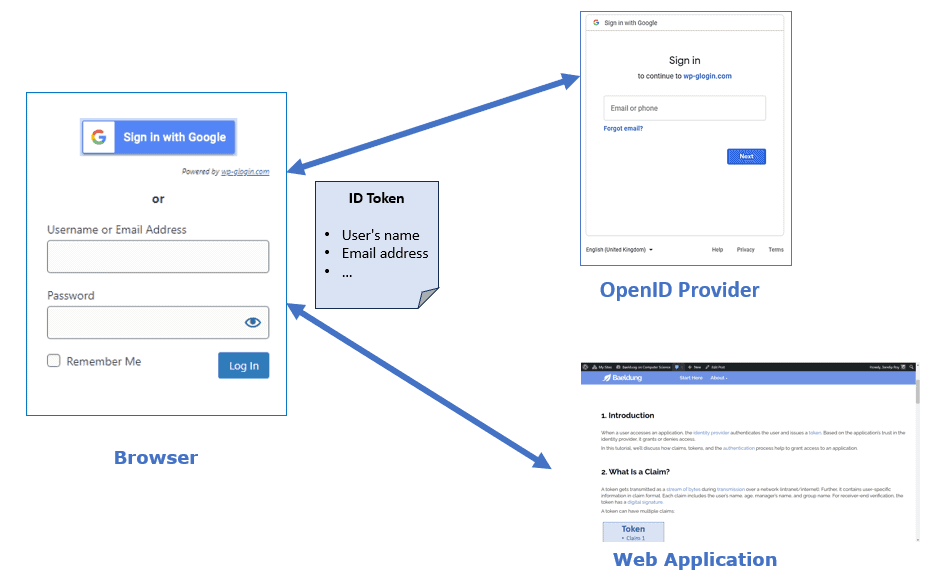
The end user accesses www.baeldung.com via their browser and selects to sign in with the Google option. The browser sends a request to Google for user authentication based on the ID token obtained through OpenID Connect.
After authenticating the user, Google returns an ID token and an access token to the user. Further, the user shares the ID token and the access token with www.baeldung.com and exchanges the access credentials with the user to grant access.
Let’s now discuss how to set up the tokens. An ID token is in JSON Web Token (JWT) format, a compact and URL-safe way of representing claims as a JSON object. A JWT consists of three parts:
Using an ID token, a client can access the resource server’s APIs:

First, the user requests access to a resource from the web browser. The browser redirects the user to the IDP for authentication.
The IDP then returns a consent page for the user to grant permission. Once the user does that, the web browser requests IDP to issue an ID token. Subsequently, the browser passes the ID Token received from IDP to the web application.
Finally, the web application uses the ID token to obtain information about the user requesting the resource from the resource server.
Now, let’s discuss a few benefits and shortcomings of ID tokens:
| Benefits | Drawbacks |
|---|---|
| ID tokens confirm the user’s identity | ID tokens aren’t encrypted by default |
| They authenticate users across different domains and platforms | An ID token doesn’t expire until the user logs out or the session expires |
| They handle multiple requests for an authenticated user | An ID token contains sensitive information about the user, such as their name, email, and role, which makes them a target for attackers |
So, although useful, ID tokens require encryption to protect users’ data.
In this article, we talked about ID tokens.
An ID token includes user information (such as username and email address) and information about the authentication event (the time, method, and authentication scope).
It doesn’t expire until the user logs out or the session expires. It also supports multiple requests for an authenticated user.
In addition to verifying identity, an ID token can verify a user’s access rights and is used as a bearer token in the authorization header of an HTTP request.