How to Set JVM Arguments in IntelliJ IDEA?
Last updated: February 19, 2026


Mocking is an essential part of unit testing, and the Mockito library makes it easy to write clean and intuitive unit tests for your Java code.
Get started with mocking and improve your application tests using our Mockito guide:
Handling concurrency in an application can be a tricky process with many potential pitfalls. A solid grasp of the fundamentals will go a long way to help minimize these issues.
Get started with understanding multi-threaded applications with our Java Concurrency guide:
Spring 5 added support for reactive programming with the Spring WebFlux module, which has been improved upon ever since. Get started with the Reactor project basics and reactive programming in Spring Boot:
Since its introduction in Java 8, the Stream API has become a staple of Java development. The basic operations like iterating, filtering, mapping sequences of elements are deceptively simple to use.
But these can also be overused and fall into some common pitfalls.
To get a better understanding on how Streams work and how to combine them with other language features, check out our guide to Java Streams:
Explore Spring Boot 3 and Spring 6 in-depth through building a full REST API with the framework:
Yes, Spring Security can be complex, from the more advanced functionality within the Core to the deep OAuth support in the framework.
I built the security material as two full courses - Core and OAuth, to get practical with these more complex scenarios. We explore when and how to use each feature and code through it on the backing project.
You can explore the course here:
Spring Data JPA is a great way to handle the complexity of JPA with the powerful simplicity of Spring Boot.
Get started with Spring Data JPA through the guided reference course:
Refactor Java code safely — and automatically — with OpenRewrite.
Refactoring big codebases by hand is slow, risky, and easy to put off. That’s where OpenRewrite comes in. The open-source framework for large-scale, automated code transformations helps teams modernize safely and consistently.
Each month, the creators and maintainers of OpenRewrite at Moderne run live, hands-on training sessions — one for newcomers and one for experienced users. You’ll see how recipes work, how to apply them across projects, and how to modernize code with confidence.
Join the next session, bring your questions, and learn how to automate the kind of work that usually eats your sprint time.
Distributed systems often come with complex challenges such as service-to-service communication, state management, asynchronous messaging, security, and more.
Dapr (Distributed Application Runtime) provides a set of APIs and building blocks to address these challenges, abstracting away infrastructure so we can focus on business logic.
In this tutorial, we'll focus on Dapr's pub/sub API for message brokering. Using its Spring Boot integration, we'll simplify the creation of a loosely coupled, portable, and easily testable pub/sub messaging system:
1. Overview
IntelliJ IDEA is among the most popular and powerful IDEs for developing software in various programming languages.
In this tutorial, we’ll learn how to configure JVM arguments in IntelliJ IDEA, allowing us to tune the JVM for development and debugging.
2. Basics of JVM Arguments
We can choose JVM arguments to match our specific needs depending on the requirements of our application. The correct JVM arguments can improve an application’s performance and stability and make it easier to debug our application.
2.1. Types of JVM Arguments
There are a few categories of JVM arguments:
- Memory allocation – such as -Xms (initial heap size) or -Xmx (maximum heap size)
- Garbage collection – such as -XX:+UseConcMarkSweepGC (enables the concurrent mark-sweep garbage collector) or -XX:+UseParallelGC (enables the parallel garbage collector)
- Debugging – such as -XX:+HeapDumpOnOutOfMemoryError (heap dump when an OutOfMemoryError occurs) or -agentlib:jdwp=transport=dt_socket,server=y,suspend=n,address=5005 for remote debugging through JDWP on port 5005.
- System properties – such as -Djava.version (Java version) or -Dcustom.property=value (defines a custom property with its value).
2.2. When to Use JVM Arguments
The decision to set specific JVM arguments depends on several factors, including the complexity of the application and its performance requirements.
While setting JVM arguments is sometimes a technical necessity, it may also be a part of the team’s workflow. For instance, a team may have a policy of setting the JVM argument for enabling profiling to identify performance bottlenecks.
Using commonly used JVM arguments can enhance our application’s performance and functionality.
3. Setting JVM Arguments in IntelliJ IDEA
Before we delve into the steps for setting up JVM arguments in the IDE, let’s first understand why it can be beneficial.
3.1. Why JVM Arguments Matter in IntelliJ IDEA
IntelliJ IDEA offers a user-friendly interface for configuring JVM arguments when the IDE runs our JVM. This is easier than going to the command line and running java manually.
Alternative methods of setting JVM arguments benefit from being environment-independent, as the configurations made in IntelliJ IDEA are specific to the IDE.
3.2. Setting JVM Arguments With Run/Debug Configurations
Let’s launch IntelliJ IDEA and open an existing project or a new one for which we’ll configure JVM arguments. We continue by clicking “Run” and selecting “Edit Configurations…”.
From there, we can create a run/debug configuration for our application by clicking the plus symbol and selecting “Application”:

We’ll add the text field for adding JVM arguments by selecting “Add VM options” in the “Modify options” dropdown and add all the required JVM arguments to the newly added text field.
With the desired configuration in place, we can run or debug our application using the configured JVM arguments.
4. Setting JVM Arguments With a VM Options File
Using a file with custom JVM arguments in IntelliJ IDEA is convenient for managing complex or extensive configurations, offering a more organized and manageable approach.
Let’s open a text editor, add all the required JVM arguments, and save the file with a meaningful name and the .vmoptions extension:

For instance, we might name it custom_jvm_args.vmoptions.
Following the steps from the previous section in “Run/Debug Configurations”, let’s add the text field for JVM arguments.
Now, we’ll add the path to our custom file and not individual JVM arguments using the following format: @path/to/our/custom_jvm_args.vmoptions:

5. Managing IntelliJ IDEA JVM Arguments
Configuring JVM arguments for IntelliJ IDEA isn’t typical for regular development, but we need to adjust them in some scenarios.
We might be working with an atypically large project or complex codebase, which would require the IDE to run with more memory than the default settings provide. Alternatively, we might use specific external tools or plugins integrated into IntelliJ IDEA, which require specific JVM arguments to run correctly.
A default configuration is located in the IDE’s installation directory. However, it isn’t recommended that this be changed as it gets overridden when we upgrade the IDE.
Instead, let’s edit a copy of the default configuration, which overrides the default configuration, by navigating to “Help” and then “Edit Custom VM Options…”:
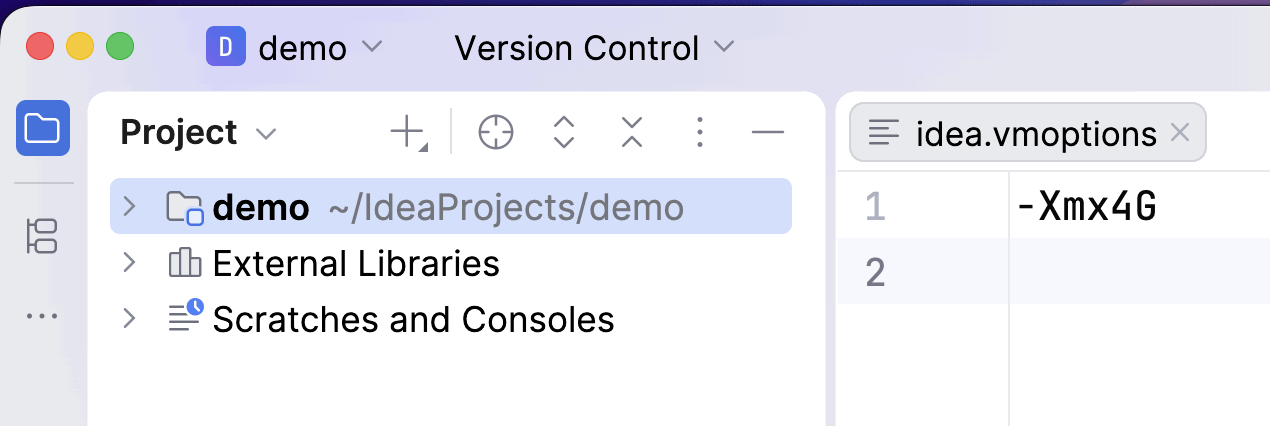
Here, we can set the required JVM arguments.
6. Conclusion
In this article, we looked at setting JVM arguments in IntelliJ IDEA for our applications. We discussed the importance of setting JVM arguments during development.
Additionally, we briefly discussed configuring the JVM arguments for the IDE and the scenarios that might require it.

















