Basic Introduction to JMX
Last updated: May 11, 2024


Mocking is an essential part of unit testing, and the Mockito library makes it easy to write clean and intuitive unit tests for your Java code.
Get started with mocking and improve your application tests using our Mockito guide:
Handling concurrency in an application can be a tricky process with many potential pitfalls. A solid grasp of the fundamentals will go a long way to help minimize these issues.
Get started with understanding multi-threaded applications with our Java Concurrency guide:
Spring 5 added support for reactive programming with the Spring WebFlux module, which has been improved upon ever since. Get started with the Reactor project basics and reactive programming in Spring Boot:
Since its introduction in Java 8, the Stream API has become a staple of Java development. The basic operations like iterating, filtering, mapping sequences of elements are deceptively simple to use.
But these can also be overused and fall into some common pitfalls.
To get a better understanding on how Streams work and how to combine them with other language features, check out our guide to Java Streams:
Explore Spring Boot 3 and Spring 6 in-depth through building a full REST API with the framework:
Yes, Spring Security can be complex, from the more advanced functionality within the Core to the deep OAuth support in the framework.
I built the security material as two full courses - Core and OAuth, to get practical with these more complex scenarios. We explore when and how to use each feature and code through it on the backing project.
You can explore the course here:
Spring Data JPA is a great way to handle the complexity of JPA with the powerful simplicity of Spring Boot.
Get started with Spring Data JPA through the guided reference course:
Refactor Java code safely — and automatically — with OpenRewrite.
Refactoring big codebases by hand is slow, risky, and easy to put off. That’s where OpenRewrite comes in. The open-source framework for large-scale, automated code transformations helps teams modernize safely and consistently.
Each month, the creators and maintainers of OpenRewrite at Moderne run live, hands-on training sessions — one for newcomers and one for experienced users. You’ll see how recipes work, how to apply them across projects, and how to modernize code with confidence.
Join the next session, bring your questions, and learn how to automate the kind of work that usually eats your sprint time.
Distributed systems often come with complex challenges such as service-to-service communication, state management, asynchronous messaging, security, and more.
Dapr (Distributed Application Runtime) provides a set of APIs and building blocks to address these challenges, abstracting away infrastructure so we can focus on business logic.
In this tutorial, we'll focus on Dapr's pub/sub API for message brokering. Using its Spring Boot integration, we'll simplify the creation of a loosely coupled, portable, and easily testable pub/sub messaging system:
1. Introduction
The Java Management Extensions (JMX) framework was introduced in Java 1.5 and has found widespread acceptance in the Java developers community since its inception.
It provides an easily configurable, scalable, reliable and more or less friendly infrastructure for managing Java application either locally or remotely. The framework introduces the concept of MBeans for real-time management of applications.
This article is a beginner’s step by step guide to create and setup a basic MBean and manage it through JConsole.
2. JMX Architecture
JMX architecture follows a three-layered approach:
- Instrumentation layer: MBeans registered with the JMX agent through which resources are managed
- JMX agent layer: the core component (MbeanServer) which maintains registry of managed MBeans and provides an interface to access them
- Remote management layer: usually client side tool like JConsole
3. Creating an MBean Class
While creating MBeans, there is a particular design pattern which we must conform to. The model MBean class MUST implement an interface with the following name: “model class name” plus MBean.
So let’s define our MBean interface and the class implementing it:
public interface GameMBean {

    public void playFootball(String clubName);

    public String getPlayerName();

    public void setPlayerName(String playerName);

}
public class Game implements GameMBean {

    private String playerName;

    @Override
    public void playFootball(String clubName) {
        System.out.println(
          this.playerName + " playing football for " + clubName);
    }

    @Override
    public String getPlayerName() {
        System.out.println("Return playerName " + this.playerName);
        return playerName;
    }

    @Override
    public void setPlayerName(String playerName) {
        System.out.println("Set playerName to value " + playerName);
        this.playerName = playerName;
    }
}
The Game class overrides a method playFootball() of the parent interface. Apart from this, the class has a member variable playerName and getter/setter for it.
Note that getter/setter are also declared in the parent interface.
4. Instrumenting With the JMX Agent
JMX agents are the entities running either locally or remotely which provide the management access to the MBeans registered with them.
Let’s use PlatformMbeanServer – the core component of JMX agent and register the Game MBean with it.
We’ll use another entity – ObjectName – to register the Game class instance with the PlatformMbeanServer; this is a String consisting of two parts:
- domain: can be an arbitrary String, but according to MBean naming conventions, it should have Java package name (avoids naming conflicts)
- key: a list of “key=value” pairs separated by a comma
In this example, we’ll use: “com.baledung.tutorial:type=basic,name=game”.
We’ll get the MBeanServer from the factory class java.lang.management.ManagementFactory.
Then we’ll register the model MBean using the created ObjectName:
try {
    ObjectName objectName = new ObjectName("com.baeldung.tutorial:type=basic,name=game");
    MBeanServer server = ManagementFactory.getPlatformMBeanServer();
    server.registerMBean(new Game(), objectName);
} catch (MalformedObjectNameException | InstanceAlreadyExistsException |
        MBeanRegistrationException | NotCompliantMBeanException e) {
    // handle exceptions
}
Finally, just to be able to test it – we’ll add a while loop to prevent the application from terminating before we can access the MBean through JConsole:
while (true) {
}
5. Accessing the MBean
5.1. Connecting from the Client Side
- Start the application in the Eclipse
- Start Jconsole (located in the bin folder of the JDK installation directory of your machine)
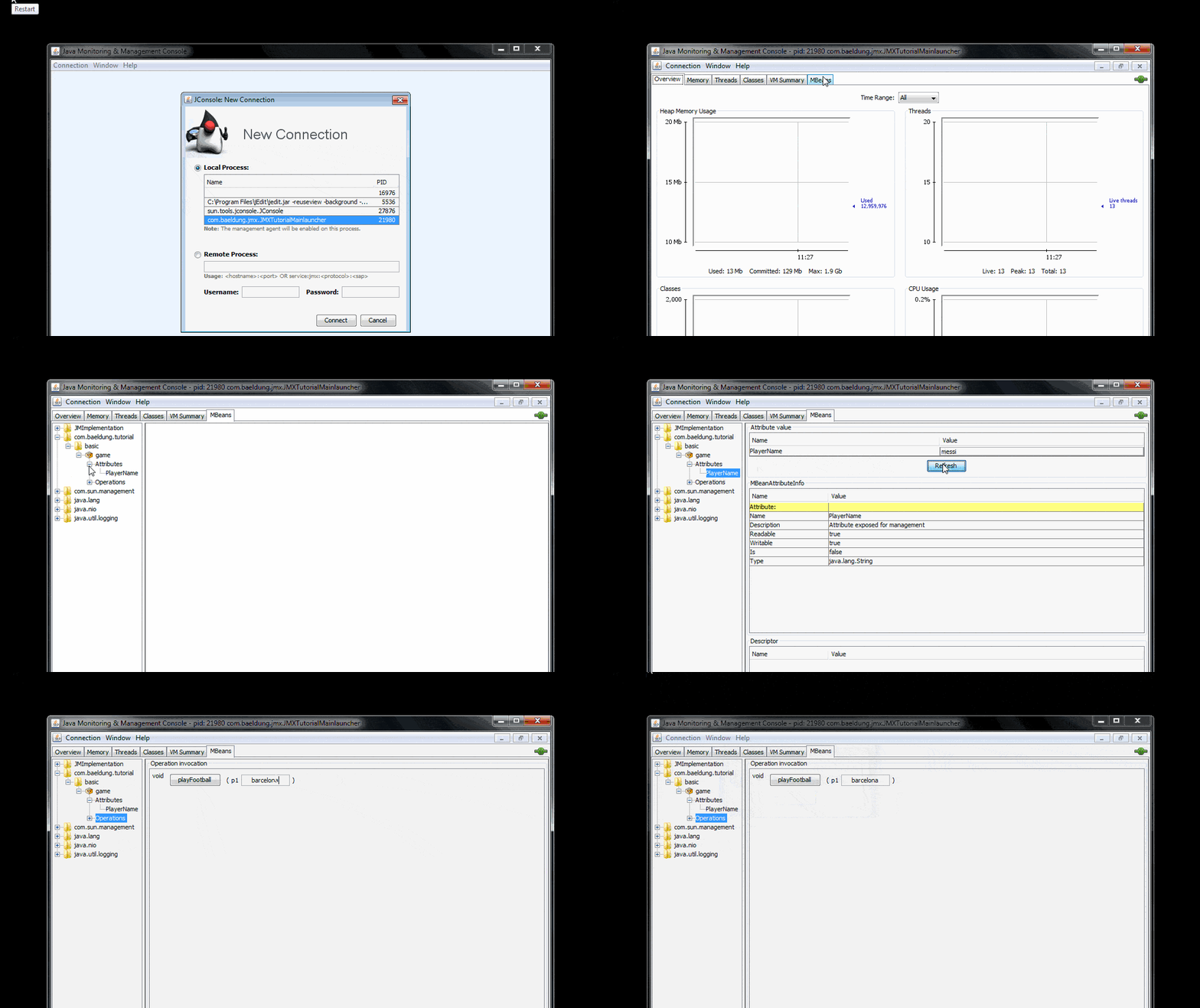
- Connection -> new Connection -> select the local Java process of this tutorial -> Connect ->Insecure SSl connection warning -> Continue with insecure connection
- After connection is established, click on the top right MBeans tab of the View pane
- List of registered MBeans will appear in left column
- Click com.baeldung.tutorial -> basic -> game
- Under game, there will be two rows, one each for attributes and operations
Here’s a quick look at the JConsole part of the process:
5.2. Managing the MBean
The basics of MBean management are simple:
- Attributes can read or written
- Methods can be invoked and arguments can be supplied to them or values returned from them
Let’s see what that means for the Game MBean in practice:
- attribute: type a new value for the attribute playerName – for example “Messi” and click Refresh button
The Following log will appear in the Eclipse console:
Set playerName to value Messi
- operations: type a value for the String argument of method playFootBall() – for example “Barcelona” and click on the method button. A window alert for successful invocation will appear
The following log will appear in the eclipse console:
Messi playing football for Barcelona
6. Conclusion
This tutorial touched upon the basics of setting up a JMX-enabled application by use of MBeans. Also, it discussed about using a typical client-side tool like JConsole to manage the instrumented MBean.
The domain of JMX technology is very wide in scope and reach. This tutorial can be considered a beginner’s step towards that.


















