


Learn through the super-clean Baeldung Pro experience:
>> Membership and Baeldung Pro.
No ads, dark-mode and 6 months free of IntelliJ Idea Ultimate to start with.
Last updated: November 6, 2024
Learn through the super-clean Baeldung Pro experience:
>> Membership and Baeldung Pro.
No ads, dark-mode and 6 months free of IntelliJ Idea Ultimate to start with.
GitLab isolates stages and jobs in CI/CD pipelines for improved security, reliability, and efficiency. It provides a new environment for each job, which helps reduce unintended interference between jobs. As a result, files created in one stage aren’t directly accessible in other stages.
In this tutorial, we’ll learn how to use artifacts to pass data to another stage.
At a fundamental level, passing artifacts from one job to another is a 2-step process:

One job defines the artifacts, and the other downloads them. So, there is a dependency need between the two jobs, where a successful run of job2 depends on job1 generating the artifacts.
GitLab imposes a default execution behavior for jobs to download artifacts produced in all the previous stages. However, we can control this behavior by using the dependencies keyword.
Let’s use the artifacts keyword to define artifacts in the .gitlab-ci.yml file that defines three jobs, each in a different stage:
$ cat .gitlab-ci.yml
stages:
  - stage1
  - stage2
  - stage3

job1:
  stage: stage1
  script:
    - echo "job1 - executing task1" > task1.txt
    - echo "job1 - executing task2" > task2.txt
  artifacts:
    paths:
      - task1.txt
      - task2.txt

job2:
  stage: stage2
  script:
    - cat task1.txt
    - cat task2.txt
    - echo "job2 - executing task1" > task1.txt
    - echo "job2 - executing task2" > task2.txt
  artifacts:
    paths:
      - task1.txt
      - task2.txt

job3:
  stage: stage3
  script:
    - cat task1.txt
    - cat task2.txt
Both job1 and job2 save the task1.txt and task2.txt files as artifacts. Since job2 runs as part of stage2, which executes after stage1, it’ll download these files as job1 artifacts and later override these.
Later, when job3 runs as part of stage3, it’ll download the artifacts from all previous stages but only sees the latest version of task1.txt and task3.txt files written by job2. We can verify this from the job logs for job3:
Downloading artifacts
00:01
Downloading artifacts for job1 (8252551460)...
Downloading artifacts from coordinator... ok        host=storage.googleapis.com id=8252551460 responseStatus=200 OK token=glcbt-66
Downloading artifacts for job2 (8252551461)...
Downloading artifacts from coordinator... ok        host=storage.googleapis.com id=8252551461 responseStatus=200 OK token=glcbt-66
Executing "step_script" stage of the job script
00:00
Using docker image sha256:243309b48f4ab04a5de198e1ef7ec8b224aa96924f096f188dd6c616c3a71233 for ruby:3.1 with digest ruby@sha256:ba4d592a4fc6e3f5d2a9a52a1a3bbefde53308e786de4f66ba72237b18b15676 ...
$ cat task1.txt
job2 - executing task1
$ cat task2.txt
job2 - executing task2
Now, let’s edit the .gitlab-ci.yml file and add an explicit dependency of job3 over job1:
$ cat .gitlab-ci.yml
# job1 and job2 definitions are same as earlier
job3:
  stage: stage3
  dependencies:
    - job1
  script:
    - cat task1.txt
    - cat task2.txt
Next, let’s see a live run of the CI/CD pipeline through the GitLab UI:

Although job3 doesn’t depend on job2, it still executes after job2, as using the dependencies keyword doesn’t alter the job execution order. So, all the jobs are executed sequentially by the order of stages.
Lastly, let’s see the job logs for job3 after a successful run of the pipeline:
Downloading artifacts
00:01
Downloading artifacts for job1 (8252561668)...
Downloading artifacts from coordinator... ok        host=storage.googleapis.com id=8252561668 responseStatus=200 OK token=glcbt-66
Executing "step_script" stage of the job script
00:01
Using docker image sha256:243309b48f4ab04a5de198e1ef7ec8b224aa96924f096f188dd6c616c3a71233 for ruby:3.1 with digest ruby@sha256:ba4d592a4fc6e3f5d2a9a52a1a3bbefde53308e786de4f66ba72237b18b15676 ...
$ cat task1.txt
job1 - executing task1
$ cat task2.txt
job1 - executing task2
Cleaning up project directory and file based variables
00:00
Job succeeded
We can see that job3 didn’t download the artifacts from job2 because we specified an explicit dependency only on job1.
Although we can control the download behavior of artifacts using the dependencies keyword, the execution order of jobs is strictly based on the sequence of stages. We can use the needs keyword to create an acyclic dependency graph for the jobs, thereby improving the overall execution performance.
Let’s use the needs keyword for enhancing the .gitlab-ci.yml CI/CD pipeline:
$ cat .gitlab-ci.yml
stages:
  - stage1
  - stage2
  - stage3

job1:
  stage: stage1
  needs: []
  script:
    - echo "job1 - executing task1" > task1.txt
    - echo "job1 - executing task2" > task2.txt
  artifacts:
    paths:
      - task1.txt
      - task2.txt

job2:
  stage: stage2
  needs: ["job1"]
  script:
    - echo "job2 - executing task1" > task1.txt
    - echo "job2 - executing task2" > task2.txt
  artifacts:
    paths:
      - task1.txt
      - task2.txt

job3:
  stage: stage3
  needs: ["job1"]
  script:
    - cat task1.txt
    - cat task2.txt
We used the needs keyword to specify a dependency on job1 for the remaining two jobs, namely, job2 and job3. As a result, job2 and job3 will be executed in parallel, despite belonging to different stages.
Next, we can check the job dependencies in the GitLab UI for a sample run of the pipeline:
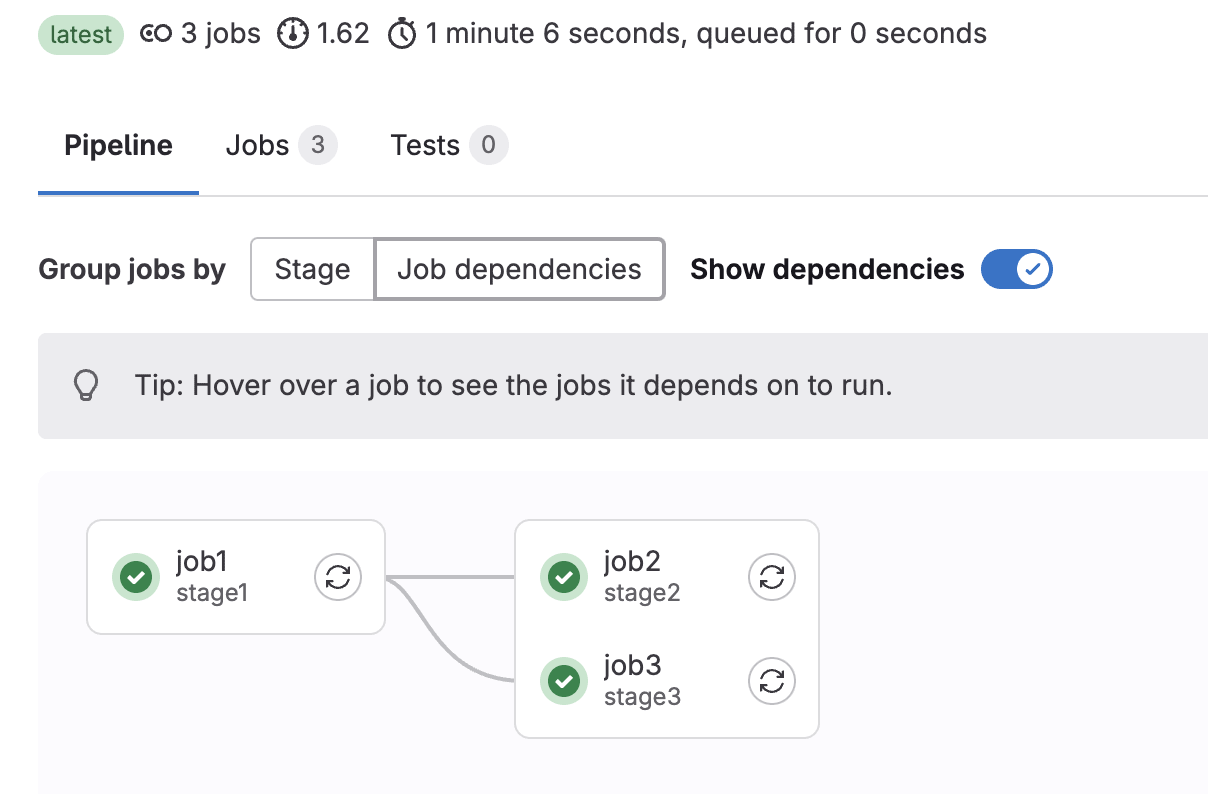
The pipeline duration is 1 minute 6 seconds, significantly less than the pipeline with the dependencies keyword, which was active for 1 minute 35 seconds. However, we must note that the compute minutes for billing purposes would still simply sum the execution time duration for each job, even if they are executed parallelly.
Lastly, we can check the logs for job3 to verify that it downloaded artifacts from job1 only:
Downloading artifacts
00:01
Downloading artifacts for job1 (8252613758)...
Downloading artifacts from coordinator... ok        host=storage.googleapis.com id=8252613758 responseStatus=200 OK token=glcbt-66
Executing "step_script" stage of the job script
00:01
Using docker image sha256:243309b48f4ab04a5de198e1ef7ec8b224aa96924f096f188dd6c616c3a71233 for ruby:3.1 with digest ruby@sha256:ba4d592a4fc6e3f5d2a9a52a1a3bbefde53308e786de4f66ba72237b18b15676 ...
$ cat task1.txt
job1 - executing task1
$ cat task2.txt
job1 - executing task2
Cleaning up project directory and file based variables
00:00
Job succeeded
Great! It looks like we nailed this one.
We can also use the GitLab job artifacts API to download a job artifact explicitly and turn off the automatic download by setting the needs: artifacts to false. As a result, we get finer control over the job execution order and downloading the artifacts.
Let’s look at the .gitlab-ci.yml CI/CD configuration file where we’re downloading artifacts from job1 and job2 in job3:
$ cat .gitlab-ci.yml
stages:
  - stage1
  - stage2
  - stage3

job1:
  stage: stage1
  needs: []
  script:
    - echo "job1 - executing task1" > task1.txt
    - echo "job1 - executing task2" > task2.txt
  artifacts:
    paths:
      - task1.txt
      - task2.txt

job2:
  stage: stage2
  needs: []
  script:
    - echo "job2 - executing task1" > task1.txt
    - echo "job2 - executing task2" > task2.txt
  artifacts:
    paths:
      - task1.txt
      - task2.txt

job3:
  stage: stage3
  needs:
    - job: job1
      artifacts: false
    - job: job2
      artifacts: false
  script: |
    for job in job1 job2
    do
        curl --silent --location --output artifacts_job1.zip \
          "https://gitlab.com/api/v4/projects/$CI_PROJECT_ID/jobs/artifacts/$CI_COMMIT_BRANCH/download?job=$job&job_token=$CI_JOB_TOKEN"
        unzip -o artifacts_job1.zip
        cat task1.txt
        cat task2.txt
    done
We constructed the API endpoint using the predefined GitLab variables, such as $CI_PROJECT_ID, $CI_COMMIT_BRANCH, and $CI_JOB_TOKEN.
Further, we can check the job logs for job3 to confirm that both artifacts are downloaded correctly:
...
Archive:  artifacts.zip
  inflating: task1.txt
  inflating: task2.txt
job1 - executing task1
job1 - executing task2
Archive:  artifacts.zip
  inflating: task1.txt
  inflating: task2.txt
job2 - executing task1
job2 - executing task2
Cleaning up project directory and file based variables
00:00
Job succeeded
Fantastic! It worked as expected.
In this article, we explored different ways to pass artifacts to another stage in a GitLab CI/CD pipeline. Further, we learned about the artifacts, dependencies, and needs keywords that are most commonly used to pass artifacts.
Lastly, we also used the GitLab API to download artifacts explicitly in a GitLab job.
As always, the code used in this tutorial is available over on GitHub.