Function Calling in Java and Spring AI Using the Mistral AI API
Last updated: November 4, 2025


Mocking is an essential part of unit testing, and the Mockito library makes it easy to write clean and intuitive unit tests for your Java code.
Get started with mocking and improve your application tests using our Mockito guide:
Handling concurrency in an application can be a tricky process with many potential pitfalls. A solid grasp of the fundamentals will go a long way to help minimize these issues.
Get started with understanding multi-threaded applications with our Java Concurrency guide:
Spring 5 added support for reactive programming with the Spring WebFlux module, which has been improved upon ever since. Get started with the Reactor project basics and reactive programming in Spring Boot:
Since its introduction in Java 8, the Stream API has become a staple of Java development. The basic operations like iterating, filtering, mapping sequences of elements are deceptively simple to use.
But these can also be overused and fall into some common pitfalls.
To get a better understanding on how Streams work and how to combine them with other language features, check out our guide to Java Streams:
Explore Spring Boot 3 and Spring 6 in-depth through building a full REST API with the framework:
Yes, Spring Security can be complex, from the more advanced functionality within the Core to the deep OAuth support in the framework.
I built the security material as two full courses - Core and OAuth, to get practical with these more complex scenarios. We explore when and how to use each feature and code through it on the backing project.
You can explore the course here:
Spring Data JPA is a great way to handle the complexity of JPA with the powerful simplicity of Spring Boot.
Get started with Spring Data JPA through the guided reference course:
Refactor Java code safely — and automatically — with OpenRewrite.
Refactoring big codebases by hand is slow, risky, and easy to put off. That’s where OpenRewrite comes in. The open-source framework for large-scale, automated code transformations helps teams modernize safely and consistently.
Each month, the creators and maintainers of OpenRewrite at Moderne run live, hands-on training sessions — one for newcomers and one for experienced users. You’ll see how recipes work, how to apply them across projects, and how to modernize code with confidence.
Join the next session, bring your questions, and learn how to automate the kind of work that usually eats your sprint time.
Distributed systems often come with complex challenges such as service-to-service communication, state management, asynchronous messaging, security, and more.
Dapr (Distributed Application Runtime) provides a set of APIs and building blocks to address these challenges, abstracting away infrastructure so we can focus on business logic.
In this tutorial, we'll focus on Dapr's pub/sub API for message brokering. Using its Spring Boot integration, we'll simplify the creation of a loosely coupled, portable, and easily testable pub/sub messaging system:
1. Overview
Using large language models, we can retrieve a lot of useful information. We can learn many new facts about anything and get answers based on existing data on the internet. We can ask them to process input data and perform various actions. But what if we ask the model to use an API to prepare the output?
For this purpose, we can use Function Calling. Function calling allows LLMs to interact with and manipulate data, perform calculations, or retrieve information beyond their inherent textual capabilities.
In this article, we’ll explore what function calling is and how we can use it to integrate the LLMs with our internal logic. As the model provider, we’ll use the Mistral AI API.
2. Mistral AI API
Mistral AI focuses on providing open and portable generative AI models for developers and businesses. We can use it for simple prompts as well as for function-calling integrations.
2.1. Retrieve API Key
To start using the Mistral API, we first need to retrieve the API key. Let’s go to the API-keys management console:

To activate any key we have to set up the billing configuration or use the trial period if available:
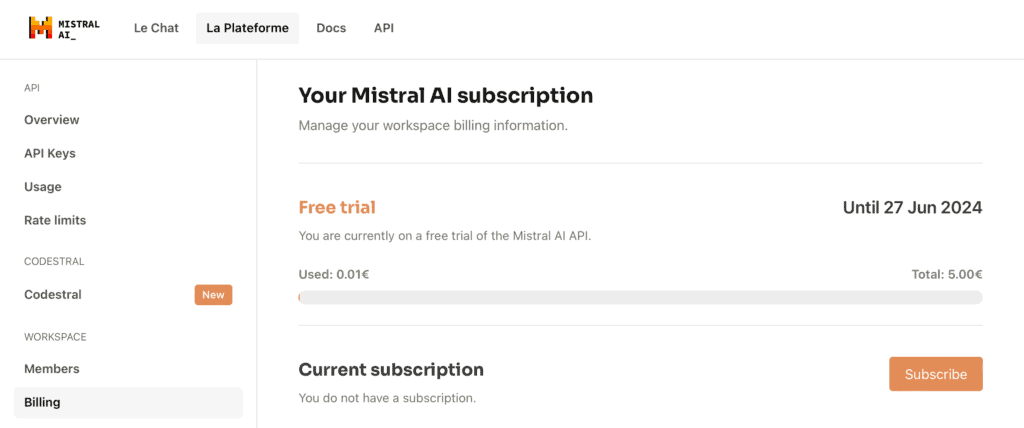
After settling everything, we can push the Create new key button to obtain the Mistral API key.
2.2. Example of Usage
Let’s start with a simple prompting. We’ll ask the Mistral API to return us a list of patient statuses. Let’s implement such a call:
@Test
void givenHttpClient_whenSendTheRequestToChatAPI_thenShouldBeExpectedWordInResponse() throws IOException, InterruptedException {

    String apiKey = System.getenv("MISTRAL_API_KEY");
    String apiUrl = "https://api.mistral.ai/v1/chat/completions";
    String requestBody = "{"
      + "\"model\": \"mistral-large-latest\","
      + "\"messages\": [{\"role\": \"user\", "
      + "\"content\": \"What the patient health statuses can be?\"}]"
      + "}";

    HttpClient client = HttpClient.newHttpClient();
    HttpRequest request = HttpRequest.newBuilder()
      .uri(URI.create(apiUrl))
      .header("Content-Type", "application/json")
      .header("Accept", "application/json")
      .header("Authorization", "Bearer " + apiKey)
      .POST(HttpRequest.BodyPublishers.ofString(requestBody))
      .build();

    HttpResponse<String> response = client.send(request, HttpResponse.BodyHandlers.ofString());
    String responseBody = response.body();
    logger.info("Model response: " + responseBody);

    Assertions.assertThat(responseBody)
      .containsIgnoringCase("healthy");
}
We created an HTTP request and sent it to the /chat/completions endpoint. Then, we used the API key as the authorization header value. As expected, in the response we see both metadata and the content itself:
Model response: {"id":"585e3599275545c588cb0a502d1ab9e0","object":"chat.completion",
"created":1718308692,"model":"mistral-large-latest",
"choices":[{"index":0,"message":{"role":"assistant","content":"Patient health statuses can be
categorized in various ways, depending on the specific context or medical system being used.
However, some common health statuses include:
1.Healthy: The patient is in good health with no known medical issues.
...
10.Palliative: The patient is receiving care that is focused on relieving symptoms and improving quality of life, rather than curing the underlying disease.",
"tool_calls":null},"finish_reason":"stop","logprobs":null}],
"usage":{"prompt_tokens":12,"total_tokens":291,"completion_tokens":279}}
The example of function calling is more complex and requires a lot of preparation before the call. We’ll discover it in the next section.
3. Spring AI Integration
Let’s see a few examples of usage of the Mistral API with function calls. Using Spring AI we can avoid a lot of preparation work and let the framework do it for us.
3.1. Dependencies
The needed dependency is located in the Spring milestone repository. Let’s add it to our pom.xml:
<repositories>
    <repository>
        <id>spring-milestones</id>
        <name>Spring milestones</name>
        <url>https://repo.spring.io/milestone</url>
    </repository>
</repositories>
Now, let’s add the dependency for the Mistral API integration:
<dependency>
    <groupId>org.springframework.ai</groupId>
    <artifactId>spring-ai-mistral-ai-spring-boot-starter</artifactId>
    <version>0.8.1</version>
</dependency>
3.2. Configuration
Now let’s add the API key we obtained previously into the properties file:
spring:
  ai:
    mistralai:
      api-key: ${MISTRAL_AI_API_KEY}
      chat:
        options:
          model: mistral-small-latest
And that’s all that we need to start using the Mistral API.
3.3. Usecase With One Function
In our demo example, we’ll create a function that returns the patient’s health status based on their ID.
Let’s start by creating the patient record:
public record Patient(String patientId) {
}
Now let’s create another record for a patient’s health status:
public record HealthStatus(String status) {
}
In the next step, we’ll create a configuration class:
@Configuration
public class MistralAIFunctionConfiguration {
    public static final Map<Patient, HealthStatus> HEALTH_DATA = Map.of(
      new Patient("P001"), new HealthStatus("Healthy"),
      new Patient("P002"), new HealthStatus("Has cough"),
      new Patient("P003"), new HealthStatus("Healthy"),
      new Patient("P004"), new HealthStatus("Has increased blood pressure"),
      new Patient("P005"), new HealthStatus("Healthy"));

    @Bean
    @Description("Get patient health status")
    public Function<Patient, HealthStatus> retrievePatientHealthStatus() {
        return (patient) -> new HealthStatus(HEALTH_DATA.get(patient).status());
    }
}
Here, we’ve specified the dataset with patients’ health data. Additionally, we created the retrievePatientHealthStatus() function, which returns the health status for a given patient ID.
Now, let’s test our function by calling it within an integration:
@Import(MistralAIFunctionConfiguration.class)
@ExtendWith(SpringExtension.class)
@SpringBootTest
public class MistralAIFunctionCallingManualTest {

    @Autowired
    private MistralAiChatModel chatClient;

    @Test
    void givenMistralAiChatClient_whenAskChatAPIAboutPatientHealthStatus_thenExpectedHealthStatusIsPresentInResponse() {

        var options = MistralAiChatOptions.builder()
          .withFunction("retrievePatientHealthStatus")
          .build();

        ChatResponse paymentStatusResponse = chatClient.call(
          new Prompt("What's the health status of the patient with id P004?",  options));

        String responseContent = paymentStatusResponse.getResult().getOutput().getContent();
        logger.info(responseContent);

        Assertions.assertThat(responseContent)
          .containsIgnoringCase("has increased blood pressure");
    }
}
We’ve imported our MistralAIFunctionConfiguration class to add our retrievePatientHealthStatus() function to the test Spring context. We also injected MistralAiChatClient, which will be instantiated automatically by the Spring AI starter.
In the request to the chat API, we’ve specified the prompt text containing one of the patients’ IDs and the name of the function to retrieve the health status. Then we called the API and verified that the response contained the expected health status.
Additionally, we’ve logged the whole response text, and here is what we see there:
The patient with id P004 has increased blood pressure.3.4. Usecase With Multiple Functions
We also can specify multiple functions and AI decides which one to use based on the prompt we send.
To demonstrate it, let’s extend our HealthStatus record:
public record HealthStatus(String status, LocalDate changeDate) {
}
We’ve added the date when the status was changed last time.
Now let’s modify the configuration class:
@Configuration
public class MistralAIFunctionConfiguration {
    public static final Map<Patient, HealthStatus> HEALTH_DATA = Map.of(
      new Patient("P001"), new HealthStatus("Healthy",
        LocalDate.of(2024,1, 20)),
      new Patient("P002"), new HealthStatus("Has cough",
        LocalDate.of(2024,3, 15)),
      new Patient("P003"), new HealthStatus("Healthy",
        LocalDate.of(2024,4, 12)),
      new Patient("P004"), new HealthStatus("Has increased blood pressure",
        LocalDate.of(2024,5, 19)),
      new Patient("P005"), new HealthStatus("Healthy",
        LocalDate.of(2024,6, 1)));

    @Bean
    @Description("Get patient health status")
    public Function<Patient, String> retrievePatientHealthStatus() {
        return (patient) -> HEALTH_DATA.get(patient).status();
    }

    @Bean
    @Description("Get when patient health status was updated")
    public Function<Patient, LocalDate> retrievePatientHealthStatusChangeDate() {
        return (patient) -> HEALTH_DATA.get(patient).changeDate();
    }
}
We’ve populated change dates for each of the status items. We also created the retrievePatientHealthStatusChangeDate() function, which returns information about the status change date.
Let’s see how we can use our two new functions with the Mistral API:
@Test
void givenMistralAiChatClient_whenAskChatAPIAboutPatientHealthStatusAndWhenThisStatusWasChanged_thenExpectedInformationInResponse() {
    var options = MistralAiChatOptions.builder()
      .withFunctions(
        Set.of("retrievePatientHealthStatus",
          "retrievePatientHealthStatusChangeDate"))
      .build();

    ChatResponse paymentStatusResponse = chatClient.call(
      new Prompt(
        "What's the health status of the patient with id P005",
        options));

    String paymentStatusResponseContent = paymentStatusResponse.getResult()
      .getOutput().getContent();
    logger.info(paymentStatusResponseContent);

    Assertions.assertThat(paymentStatusResponseContent)
      .containsIgnoringCase("healthy");

    ChatResponse changeDateResponse = chatClient.call(
      new Prompt(
        "When health status of the patient with id P005 was changed?",
        options));

    String changeDateResponseContent = changeDateResponse.getResult().getOutput().getContent();
    logger.info(changeDateResponseContent);

    Assertions.assertThat(paymentStatusResponseContent)
      .containsIgnoringCase("June 1, 2024");
}
In this case, we’ve specified two function names and sent two prompts. First, we asked about the health status of a patient. And then we asked when this status was changed. We’ve verified that the results contain the expected information. Besides that, we’ve logged all the responses and here’s what it looks like:
The patient with id P005 is currently healthy.
The health status of the patient with id P005 was changed on June 1, 2024.
4. Conclusion
Function calling is a great tool to extend the LLM functionality. We can also use it to integrate LLM with our logic.
In this tutorial, we explored how we can implement the LLM-based flow by calling one or multiple of our functions. Using this approach we can implement modern applications that are integrated with AI APIs.

















