Create a RAG (Retrieval Augmented Generation) Application with Redis and Spring AI
Last updated: March 4, 2026


Mocking is an essential part of unit testing, and the Mockito library makes it easy to write clean and intuitive unit tests for your Java code.
Get started with mocking and improve your application tests using our Mockito guide:
Handling concurrency in an application can be a tricky process with many potential pitfalls. A solid grasp of the fundamentals will go a long way to help minimize these issues.
Get started with understanding multi-threaded applications with our Java Concurrency guide:
Spring 5 added support for reactive programming with the Spring WebFlux module, which has been improved upon ever since. Get started with the Reactor project basics and reactive programming in Spring Boot:
Since its introduction in Java 8, the Stream API has become a staple of Java development. The basic operations like iterating, filtering, mapping sequences of elements are deceptively simple to use.
But these can also be overused and fall into some common pitfalls.
To get a better understanding on how Streams work and how to combine them with other language features, check out our guide to Java Streams:
Explore Spring Boot 3 and Spring 6 in-depth through building a full REST API with the framework:
Yes, Spring Security can be complex, from the more advanced functionality within the Core to the deep OAuth support in the framework.
I built the security material as two full courses - Core and OAuth, to get practical with these more complex scenarios. We explore when and how to use each feature and code through it on the backing project.
You can explore the course here:
Spring Data JPA is a great way to handle the complexity of JPA with the powerful simplicity of Spring Boot.
Get started with Spring Data JPA through the guided reference course:
Refactor Java code safely — and automatically — with OpenRewrite.
Refactoring big codebases by hand is slow, risky, and easy to put off. That’s where OpenRewrite comes in. The open-source framework for large-scale, automated code transformations helps teams modernize safely and consistently.
Each month, the creators and maintainers of OpenRewrite at Moderne run live, hands-on training sessions — one for newcomers and one for experienced users. You’ll see how recipes work, how to apply them across projects, and how to modernize code with confidence.
Join the next session, bring your questions, and learn how to automate the kind of work that usually eats your sprint time.
Distributed systems often come with complex challenges such as service-to-service communication, state management, asynchronous messaging, security, and more.
Dapr (Distributed Application Runtime) provides a set of APIs and building blocks to address these challenges, abstracting away infrastructure so we can focus on business logic.
In this tutorial, we'll focus on Dapr's pub/sub API for message brokering. Using its Spring Boot integration, we'll simplify the creation of a loosely coupled, portable, and easily testable pub/sub messaging system:
1. Overview
In this tutorial, we’ll build a ChatBot using the Spring AI framework and RAG (Retrieval Augmented Generation) technique. With the help of Spring AI, we’ll integrate with the Redis Vector database to store and retrieve data to enhance the prompt for the LLM (Large Language Model). Once the LLM receives the prompt with the relevant data, it effectively generates a response with the latest data in natural language to the user query.
2. What Is Rag?
LLM are Machine Learning models pre-trained on extensive data sets from the internet. To make an LLM function within a private enterprise, we must fine-tune it with the organization-specific knowledge base. However, fine-tuning is usually a time-consuming process that requires substantial computing resources. Moreover, there is a large probability of fine-tuned LLM generating irrelevant or misleading responses to queries. This behavior is often referred to as LLM hallucinations.
In such scenarios, RAG is an excellent technique to restrict or contextualize the responses of the LLM. A vector DB plays an important role in the RAG architecture to provide contextual information to the LLM. But, before an application can use it in RAG architecture, an ETL (Extract Transform and Load) process must populate it:

The Reader retrieves the organization’s knowledge base documents from different sources. Then, the Transformer splits the retrieved documents into smaller chunks and uses an embedding model to vectorize the contents. Finally, the writer loads the vectors or embeddings into the vector DB. Vector DBs are specialized databases that can store these embeddings in a multi-dimensional space.
In RAG, LLMs can respond to almost real-time data if the vector DB is updated periodically from the organization’s knowledge base.
Once the vector DB is ready with the data, the application can use it to retrieve the contextual data for user queries:

The application forms the prompt combining the user query with the contextual data from the vector DB and finally sends it to the LLM. The LLM generates the response in natural language within the boundary of the contextual data and sends it back to the application.
3. Implement RAG With Spring AI and Redis
The Redis stack offers vector search services, we’ll use the Spring AI framework to integrate with it and build a RAG-based ChatBot application. Additionally, we’ll use the GPT-3.5 Turbo LLM model from OpenAI to generate the final response.
3.1. Prerequisites
For the ChatBot Service, to authenticate the OpenAI service we’ll need the API secret key. We’ll create one, after creating an OpenAI account:

We’ll also create a Redis Cloud account to access a free Redis Vector DB:

For integration with the Redis Vector DB and the OpenAI service, we’ll update the Maven dependencies with the Spring AI libraries:
<dependency>
    <groupId>org.springframework.ai</groupId>
    <artifactId>spring-ai-openai-spring-boot-starter</artifactId>
    <version>1.0.0-M1</version>
</dependency>
<dependency>
    <groupId>org.springframework.ai</groupId>
    <artifactId>spring-ai-transformers-spring-boot-starter</artifactId>
    <version>1.0.0-M1</version>
</dependency>
<dependency>
    <groupId>org.springframework.ai</groupId>
    <artifactId>spring-ai-redis-spring-boot-starter</artifactId>
    <version>1.0.0-M1</version>
</dependency>
<dependency>
    <groupId>org.springframework.ai</groupId>
    <artifactId>spring-ai-pdf-document-reader</artifactId>
    <version>1.0.0-M1</version>
</dependency>
3.2. Key Classes for Loading Data Into Redis
In a Spring Boot application, we’ll create components for loading and retrieving data from the Redis Vector DB. For example, we’ll load an employee handbook PDF document into the Redis DB.
Now, let’s take a look at the classes involved:

DocumentReader is a Spring AI interface for reading documents. We’ll use the out-of-the-box PagePdfDocumentReader implementation of DocumentReader. Similarly, DocumentWriter and VectorStore are interfaces for writing data into storage systems. RedisVectorStore is one of the many out-of-the-box implementations of VectorStore, which we’ll use for loading and searching data in Redis Vector DB. We’ll write the DataLoaderService using the Spring AI framework classes discussed so far.
3.3. Implement Data Loader Service
Let’s understand the load() method in the DataLoaderService class:
@Service
public class DataLoaderService {
    private static final Logger logger = LoggerFactory.getLogger(DataLoaderService.class);

    @Value("classpath:/data/Employee_Handbook.pdf")
    private Resource pdfResource;

    @Autowired
    private VectorStore vectorStore;

    public void load() {
        PagePdfDocumentReader pdfReader = new PagePdfDocumentReader(this.pdfResource,
            PdfDocumentReaderConfig.builder()
              .withPageExtractedTextFormatter(ExtractedTextFormatter.builder()
                .withNumberOfBottomTextLinesToDelete(3)
                .withNumberOfTopPagesToSkipBeforeDelete(1)
                .build())
            .withPagesPerDocument(1)
            .build());

        var tokenTextSplitter = new TokenTextSplitter();
        this.vectorStore.accept(tokenTextSplitter.apply(pdfReader.get()));
    }
}
The load() method uses the PagePdfDocumentReader class to read a PDF file and load it to the Redis Vector DB. The Spring AI framework auto-configures the VectoreStore interface using the configuration properties in the namespace spring.ai.vectorstore:
spring:
  ai:
    vectorstore:
      redis:
        uri: redis://:PQzkkZLOgOXXX@redis-19438.c330.asia-south1-1.gce.redns.redis-cloud.com:19438
        index: faqs
        prefix: "faq:"
        initialize-schema: true
The framework injects the RedisVectorStore object, an implementation of the VectorStore interface, into the DataLoaderService.
The TokenTextSplitter class splits the document and finally, the VectorStore class loads the chunks into the Redis Vector DB.
3.4. Key Classes for Generating Final Response
Once the Redis Vector DB is ready, we can retrieve the contextual information relevant to the user query. Afterward, this context is used in forming the prompt for the LLM to generate the final response. Let’s look at the key classes:
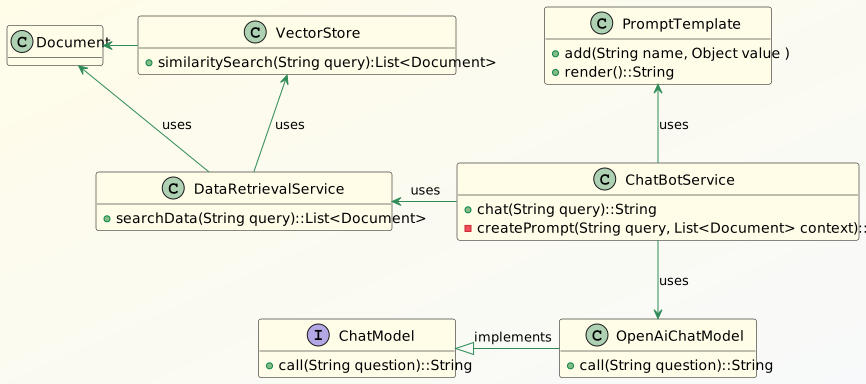
The searchData() method in the DataRetrievalService class takes in the query and then retrieves the context data from the VectorStore. The ChatBotService uses this data to form the prompt using the PromptTemplate class and then sends it to the OpenAI service. The Spring Boot framework reads the relevant OpenAI-related properties from the application.yml file and then autoconfigures the OpenAIChatModel object. In this article, we set Spring’s active profile to “airag”.
Let’s jump on to the implementation to understand in detail.
3.5. Implement Chat Bot Service
Let’s take a look at the ChatBotService class:
@Service
public class ChatBotService {
    @Qualifier("openAiChatModel")
    @Autowired
    private ChatModel chatClient;
    @Autowired
    private DataRetrievalService dataRetrievalService;

    private final String PROMPT_BLUEPRINT = """
      Answer the query strictly referring the provided context:
      {context}
      Query:
      {query}
      In case you don't have any answer from the context provided, just say:
      I'm sorry I don't have the information you are looking for.
    """;

    public String chat(String query) {
        return chatClient.call(createPrompt(query, dataRetrievalService.searchData(query)));
    }

    private String createPrompt(String query, List<Document> context) {
        PromptTemplate promptTemplate = new PromptTemplate(PROMPT_BLUEPRINT);
        promptTemplate.add("query", query);
        promptTemplate.add("context", context);
        return promptTemplate.render();
    }
}
The SpringAI framework creates ChatModel bean using the OpenAI configuration properties in the namespace spring.ai.openai:
spring:
  ai:
    vectorstore:
      redis:
        # Redis vector store related properties...
    openai:
      temperature: 0.3
      api-key: ${SPRING_AI_OPENAI_API_KEY}
      model: gpt-3.5-turbo
      #embedding-base-url: https://api.openai.com
      #embedding-api-key: ${SPRING_AI_OPENAI_API_KEY}
      #embedding-model: text-embedding-ada-002
The framework can also read the API key from the environment variable SPRING_AI_OPENAI_API_KEY which is a much secure option. We can enable the keys starting with the text embedding to create the OpenAiEmbeddingModel bean, which is used for creating vector embeddings out of the knowledge base documents.
The prompt for the OpenAI service must be unambiguous. Hence, we have strictly instructed in the prompt blueprint PROMPT_BLUEPRINT to form the response only from the context information.
In the chat() method we retrieve the documents, matching the query from the Redis Vector DB. We then use these documents and the user query to generate the prompt in the createPrompt() method. Finally, we invoke the call() method of the ChatModel class to receive the response from the OpenAI service.
Now, let’s check the chatbot service in action by asking it a question from the employee handbook loaded earlier into the Redis Vector DB:
@Test
void whenQueryAskedWithinContext_thenAnswerFromTheContext() {
    String response = chatBotService.chat("How are employees supposed to dress?");
    assertNotNull(response);
    logger.info("Response from LLM: {}", response);
}
Then, we’ll see the output:
Response from LLM: Employees are supposed to dress appropriately for their individual work responsibilities and position.The output aligns with the employee handbook PDF document loaded into the Redis Vector DB.
Let’s see what happens if we ask something which is not in the employee handbook:
@Test
void whenQueryAskedOutOfContext_thenDontAnswer() {
    String response = chatBotService.chat("What should employees eat?");
    assertEquals("I'm sorry I don't have the information you are looking for.", response);
    logger.info("Response from the LLM: {}", response);
}
here, is the resulting output:
Response from the LLM: I'm sorry I don't have the information you are looking for.The LLM couldn’t find anything in the context provided and hence couldn’t answer the query.
4. Conclusion
In this article, we discussed implementing an application based on the RAG architecture using the Spring AI framework. Forming the prompt with the contextual information is essential to generate the right response from the LLM. Hence, Redis Vector DB is an excellent solution for storing and performing similarity searches on the document vectors. Also, chunking the documents is equally important to fetch the right records and restrict the cost of the prompt tokens.

















