Streaming Real-Time Log to Splunk From Spring Boot
Last updated: September 22, 2025


Mocking is an essential part of unit testing, and the Mockito library makes it easy to write clean and intuitive unit tests for your Java code.
Get started with mocking and improve your application tests using our Mockito guide:
Handling concurrency in an application can be a tricky process with many potential pitfalls. A solid grasp of the fundamentals will go a long way to help minimize these issues.
Get started with understanding multi-threaded applications with our Java Concurrency guide:
Spring 5 added support for reactive programming with the Spring WebFlux module, which has been improved upon ever since. Get started with the Reactor project basics and reactive programming in Spring Boot:
Since its introduction in Java 8, the Stream API has become a staple of Java development. The basic operations like iterating, filtering, mapping sequences of elements are deceptively simple to use.
But these can also be overused and fall into some common pitfalls.
To get a better understanding on how Streams work and how to combine them with other language features, check out our guide to Java Streams:
Explore Spring Boot 3 and Spring 6 in-depth through building a full REST API with the framework:
Yes, Spring Security can be complex, from the more advanced functionality within the Core to the deep OAuth support in the framework.
I built the security material as two full courses - Core and OAuth, to get practical with these more complex scenarios. We explore when and how to use each feature and code through it on the backing project.
You can explore the course here:
Spring Data JPA is a great way to handle the complexity of JPA with the powerful simplicity of Spring Boot.
Get started with Spring Data JPA through the guided reference course:
Refactor Java code safely — and automatically — with OpenRewrite.
Refactoring big codebases by hand is slow, risky, and easy to put off. That’s where OpenRewrite comes in. The open-source framework for large-scale, automated code transformations helps teams modernize safely and consistently.
Each month, the creators and maintainers of OpenRewrite at Moderne run live, hands-on training sessions — one for newcomers and one for experienced users. You’ll see how recipes work, how to apply them across projects, and how to modernize code with confidence.
Join the next session, bring your questions, and learn how to automate the kind of work that usually eats your sprint time.
Distributed systems often come with complex challenges such as service-to-service communication, state management, asynchronous messaging, security, and more.
Dapr (Distributed Application Runtime) provides a set of APIs and building blocks to address these challenges, abstracting away infrastructure so we can focus on business logic.
In this tutorial, we'll focus on Dapr's pub/sub API for message brokering. Using its Spring Boot integration, we'll simplify the creation of a loosely coupled, portable, and easily testable pub/sub messaging system:
1. Overview
In this tutorial, we’ll break down the steps to stream live logs from our Spring Boot application directly into Splunk using its HTTP Event Collector (HEC). To start, we’ll configure everything on the Spring Boot side with a straightforward XML file that establishes the connection between the logs and Splunk. Additionally, we’ll use log4j2 for this setup, as it’s a popular and compatible logging framework that integrates seamlessly with Splunk.
2. What’s Splunk?
Splunk is an awesome tool for monitoring, searching, and visualizing machine-generated data. Not only is it highly effective for indexing and connecting real-time data, but it also enables us to create dashboards with engaging visualizations for seamless monitoring. Additionally, Splunk offers a range of user-friendly commands for searching, and it even includes its own Search Processing Language (SPL) for advanced queries.
3. Setting up Splunk
We can download it by navigating to the URL: Splunk Enterprise. We can go to My Dashboard (Top right) -> Splunk Enterprise (Scroll Down) -> Download (For our specific OS).
We should take note of the username and password during installation.
3.1. Configuring Splunk to Get Splunk Logs
Let’s create an index in Splunk So that we can use those credentials in Spring Boot to direct logs from it. We can navigate to Settings (Top Right) -> Data inputs -> HTTP Event Collector as shown below:
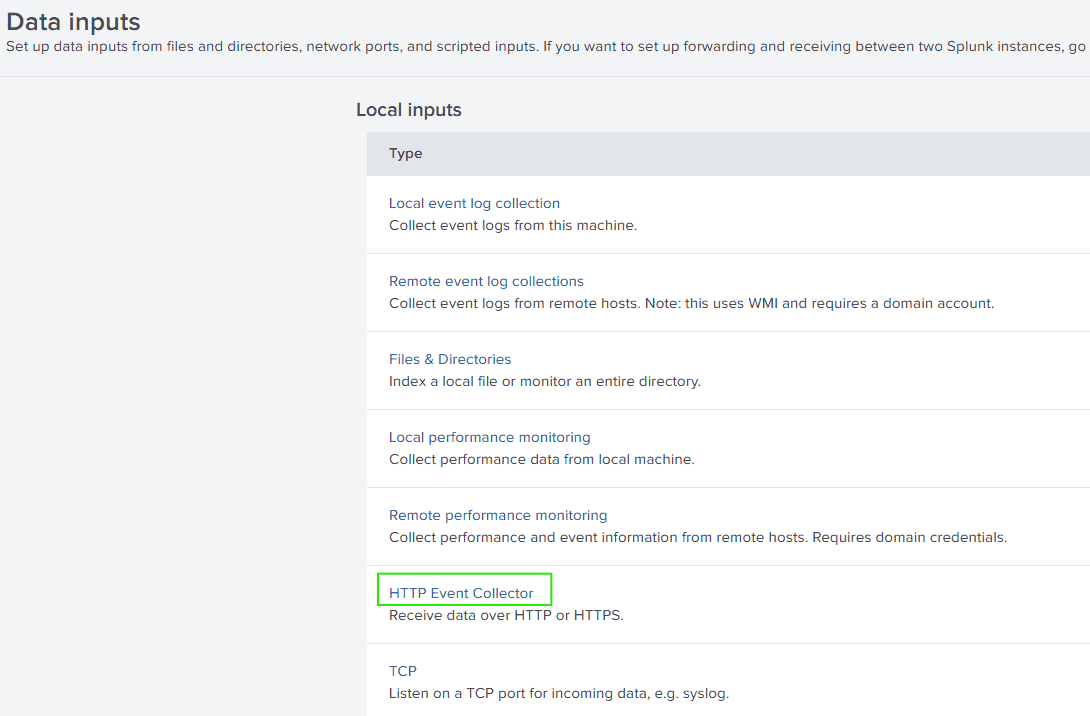
We’ll begin by creating a unique token to securely send data to Splunk. This token not only helps authenticate the data source but also tracks and controls access to the data as it’s ingested into Splunk. So, let’s click on “New token” (Top Right) and then enter the following details:
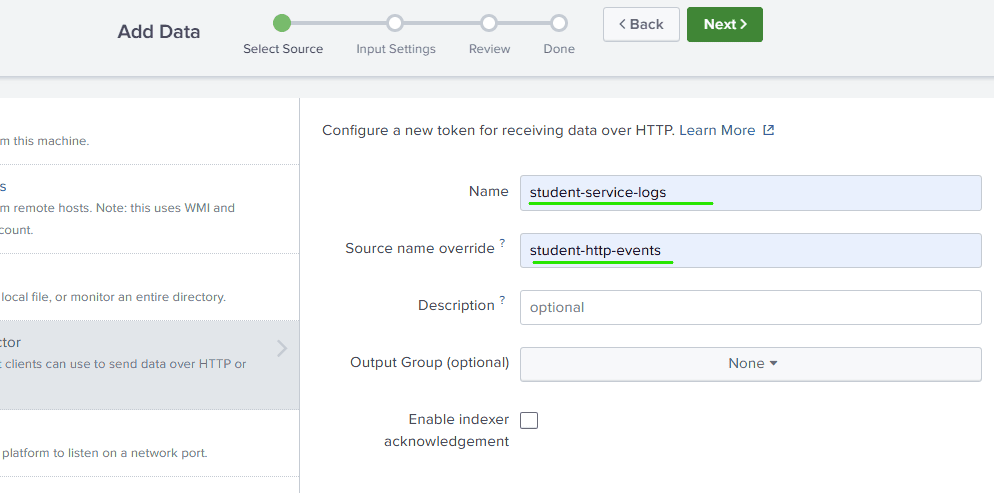
Naming Source
Here “Name” is a unique identifier for our token in the group of tokens and “Source Name Override” helps categorize our data based on its origin as well as Splunk uses it to determine how to index and search our data.
Next, we must click “Select” and choose “Log4j” in the drop-down as we’ll be using it on the Spring Boot side.

Choosing Log4j
We have to create an index to optimize how our data is sorted and queried. Notably, this index will take precedence over the source name, which, by default, serves as the default setting for a specific token. So, let’s click on “Create a new index” and give a meaningful “index name”. We can let the other fields be the default and click on “Save”.

Creating Index

Naming Index
Let’s review and click “Submit”. Again, we’ve to note the token from the row created newly.
3.2. Configuring Global Settings
First, let’s navigate to Settings (top right) -> Data Inputs -> HTTP Event Collector, and then click on the Global Settings button (top right). Next, we need to update all the properties as specified below:
All Tokens: Enabled
Default Source Type: JSON
Default Index: student_api_dev
We also have to note down the HTTP port number and let the other things be the default and Click “Save”.
Based on the “Default Index”, Splunk will automatically assign events to the student_api_dev index if we do not specify an index. “All tokens Enabled” makes the Splunk active to receive logs with all the tokens that we’ve created.
4. Sending Logs to Splunk From Spring Boot
4.1. Maven Dependencies
Let’s update the repository tag with this information:
<repository>
    <id>splunk-artifactory</id>
    <name>Splunk Releases</name>
    <url>https://splunk.jfrog.io/splunk/ext-releases-local</url>
</repository>
Since the Spring Web Starter includes spring-boot-starter-logging by default, we’ll need to exclude it explicitly to include log4j in the later steps.
<exclusion>
    <groupId>org.springframework.boot</groupId>
    <artifactId>spring-boot-starter-logging</artifactId>
</exclusion>Similarly, we’ve to exclude it from the spring-boot-starter-test also.
We’d need Splunk-library-javalogging, to accomplish all the Splunk-related configurations:
<dependency>
    <groupId>com.splunk.logging</groupId>
    <artifactId>splunk-library-javalogging</artifactId>
    <version>${splunk-logging.version}</version>
</dependency>
Our logs will be generated using log4j2, hence we need that also:
<dependency>
    <groupId>org.springframework.boot</groupId>
    <artifactId>spring-boot-starter-log4j2</artifactId>
</dependency>
4.2. Adding Controller Classes
We’ll create a RestController.java file, where we’ll implement three types of API endpoints: first, to add a student; next, to retrieve all students; and finally, to get a student by their rollNumber:
@PostMapping
public Student addStudent(@RequestBody Student student) {
    return studentService.addStudent(student);
}

@GetMapping
public List<Student> getStudents() {
    return studentService.getStudents();
}

@GetMapping("{rollNumber}")
public Student getStudent(@PathVariable("rollNumber") int rollNumber) {
    return studentService.getStudent(rollNumber);
}
4.3. Adding Model and Service Classes
Let’s create Student.java, the POJO we’ll use to represent a Student object:
public class Student {
    private String name;
    private int rollNumber;

    public Student() {
    }

    // standard getters, setters, toString(), equals() and hashCode()
}
StudentService.java is the class to perform all the operations related to the student. We also have a logger, which will print the logs in the console as well and these logs will also be sent to Splunk in the same format:
@Service
public class StudentService {
    private static final Logger logger = LogManager.getLogger(StudentService.class);
    private final List<Student> students = new ArrayList<>();
}
Specifically, it includes three methods to support three different corresponding APIs within the controller class:
public Student addStudent(Student student) {
    logger.info("addStudent: adding Student");
    logger.info("addStudent: Request: {}", student);
    students.add(student);
    logger.info("addStudent: added Student");
    logger.info("addStudent: Response: {}", student);
    return student;
}

public List<Student> getStudents() {
    logger.info("getStudents: getting Students");
    List<Student> studentsList = students;
    logger.info("getStudents: got Students");
    logger.info("getStudents: Response: {}", studentsList);
    return studentsList;
}

public Student getStudent(int rollNumber) {
    logger.info("getStudent: getting Student");
    logger.info("getStudent: Request: {}", rollNumber);
    Student student = students.stream().filter(stu -> stu.getRollNumber() == rollNumber)
      .findAny().orElseThrow(() -> new RuntimeException("Student not found"));
    logger.info("getStudent: got Student");
    logger.info("getStudent: Response: {}", student);
    return student;
}
4.4. Adding Configuration File for Splunk Logging
The following file must adhere to a particular naming convention so that Spring Boot can automatically identify it:
[logging-framework]-spring.xml
Let’s replace the part inside the square brackets with the name of the logging framework we’re using right now. For example:
log4j2-spring.xml
Now, let’s place this file in the resources folder of our Spring Boot project. By doing so, Spring Boot will automatically detect and load it:
<?xml version="1.0" encoding="UTF-8"?>
<Configuration>
    <Appenders>
        <Console name="console" target="SYSTEM_OUT">
            <PatternLayout
              pattern="%style{%d{ISO8601}} %highlight{%-5level }[%style{%t}{bright,blue}]
              %style{%C{10}}{bright,yellow}: %msg%n%throwable"/>
        </Console>
        <SplunkHttp
          name="splunkhttp"
          url="http://localhost:8088"
          token="11806291-7e0e-422a-a083-abfdd4b2eb74"
          host="localhost"
          index="student_api_dev"
          type="raw"
          source="student-http-events"
          sourcetype="log4j"
          messageFormat="text"
          disableCertificateValidation="true">
            <PatternLayout pattern="%m"/>
        </SplunkHttp>
    </Appenders>

    <Loggers>
        <Root level="info">
            <AppenderRef ref="console"/>
            <AppenderRef ref="splunkhttp"/>
        </Root>
    </Loggers>
</Configuration>
Let’s try to understand the above file:
- Appenders: This section specifies the details for the destination where the logs will be sent.
- Console: A commonly used appender that sends logs to the console.
- PatternLayout: This defines how the appender should format the logs, specifying what information to include, such as the timestamp, level, message, and more.
- SplunkHttp: This appender provides the necessary details, such as the Splunk server’s address and our Splunk token, along with other connection specifics.
- Loggers: These serve as filters, determining what should be logged.
4.5. Populating Logs in Splunk
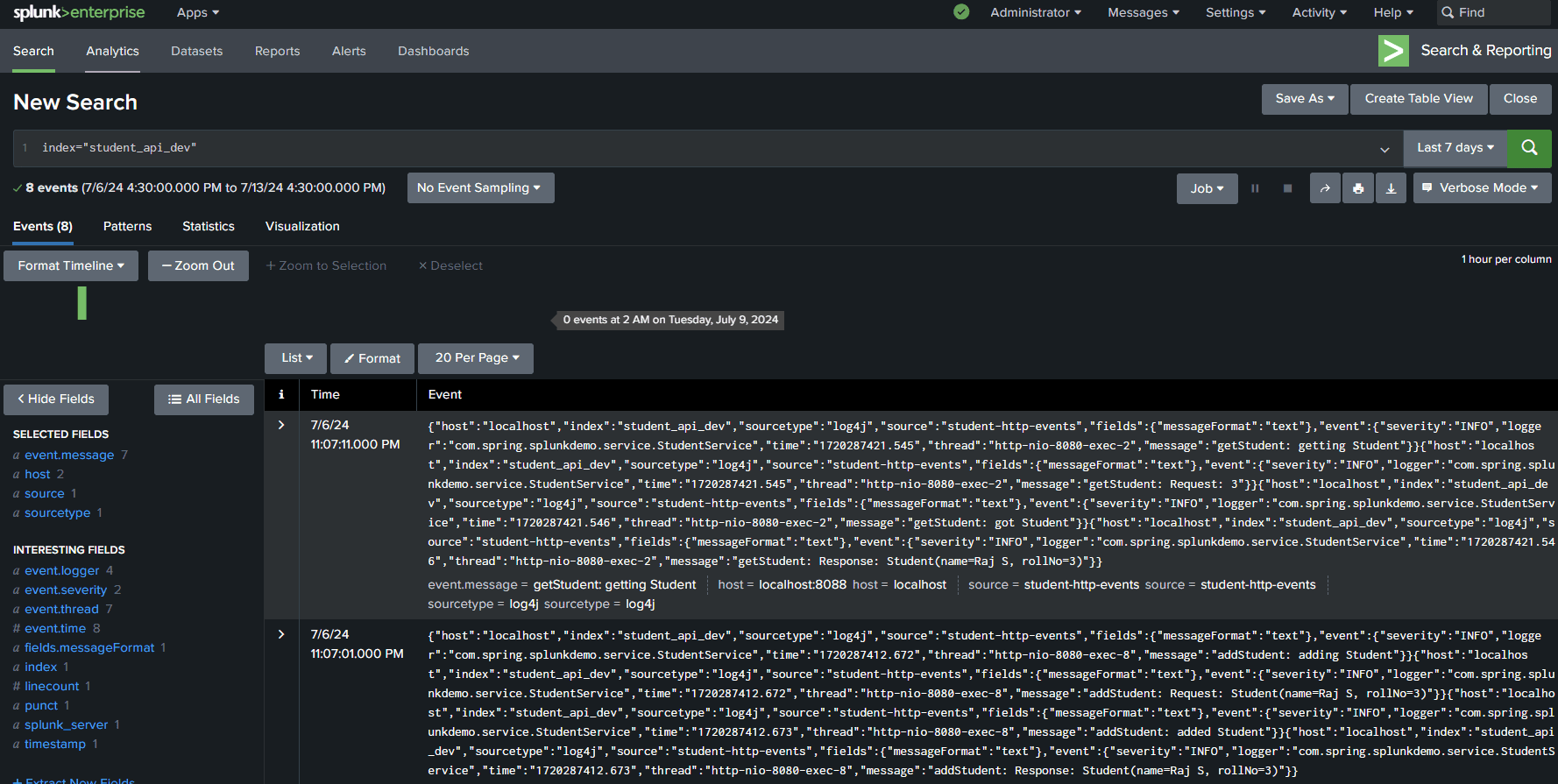
Let’s now run our application. Once it’s up and running, we can send requests to our API. After that, we can go back to Splunk and run this query:
index="student_api_dev"As a result, we’ll observe all logs similar to the below screenshot.
5. Conclusion
Splunk is a powerful tool for real-time data monitoring, search, and visualization, making it ideal for keeping track of machine-generated data. Its scalability ensures that it can handle growing data volumes efficiently, while its Search Processing Language (SPL) provides the flexibility needed for complex querying. Moreover, the platform’s real-time updates, combined with security features such as role-based access control (RBAC) and an advanced indexing system, further enhance its capability for fast and secure data analysis.
When integrated with a Spring Boot application, Splunk streamlines the process of ingesting, analyzing, and visualizing logs, providing valuable insights and alerts for proactive issue resolution in production environments.

















