


Mocking is an essential part of unit testing, and the Mockito library makes it easy to write clean and intuitive unit tests for your Java code.
Get started with mocking and improve your application tests using our Mockito guide:
Handling concurrency in an application can be a tricky process with many potential pitfalls. A solid grasp of the fundamentals will go a long way to help minimize these issues.
Get started with understanding multi-threaded applications with our Java Concurrency guide:
Spring 5 added support for reactive programming with the Spring WebFlux module, which has been improved upon ever since. Get started with the Reactor project basics and reactive programming in Spring Boot:
Since its introduction in Java 8, the Stream API has become a staple of Java development. The basic operations like iterating, filtering, mapping sequences of elements are deceptively simple to use.
But these can also be overused and fall into some common pitfalls.
To get a better understanding on how Streams work and how to combine them with other language features, check out our guide to Java Streams:
Explore Spring Boot 3 and Spring 6 in-depth through building a full REST API with the framework:
Yes, Spring Security can be complex, from the more advanced functionality within the Core to the deep OAuth support in the framework.
I built the security material as two full courses - Core and OAuth, to get practical with these more complex scenarios. We explore when and how to use each feature and code through it on the backing project.
You can explore the course here:
Spring Data JPA is a great way to handle the complexity of JPA with the powerful simplicity of Spring Boot.
Get started with Spring Data JPA through the guided reference course:
Refactor Java code safely — and automatically — with OpenRewrite.
Refactoring big codebases by hand is slow, risky, and easy to put off. That’s where OpenRewrite comes in. The open-source framework for large-scale, automated code transformations helps teams modernize safely and consistently.
Each month, the creators and maintainers of OpenRewrite at Moderne run live, hands-on training sessions — one for newcomers and one for experienced users. You’ll see how recipes work, how to apply them across projects, and how to modernize code with confidence.
Join the next session, bring your questions, and learn how to automate the kind of work that usually eats your sprint time.
Distributed systems often come with complex challenges such as service-to-service communication, state management, asynchronous messaging, security, and more.
Dapr (Distributed Application Runtime) provides a set of APIs and building blocks to address these challenges, abstracting away infrastructure so we can focus on business logic.
In this tutorial, we'll focus on Dapr's pub/sub API for message brokering. Using its Spring Boot integration, we'll simplify the creation of a loosely coupled, portable, and easily testable pub/sub messaging system:
1. Introduction
Design patterns are an essential part of software development. These solutions not only solve recurring problems but also help developers understand the design of a framework by recognizing common patterns.
In this tutorial, we’ll look at four of the most common design patterns used in the Spring Framework:
- Singleton pattern
- Factory Method pattern
- Proxy pattern
- Template pattern
We’ll also look at how Spring uses these patterns to reduce the burden on developers and help users quickly perform tedious tasks.
2. Singleton Pattern
The singleton pattern is a mechanism that ensures only one instance of an object exists per application. This pattern can be useful when managing shared resources or providing cross-cutting services, such as logging.
2.1. Singleton Beans
Generally, a singleton is globally unique for an application, but in Spring, this constraint is relaxed. Instead, Spring restricts a singleton to one object per Spring IoC container. In practice, this means Spring will only create one bean for each type per application context.
Spring’s approach differs from the strict definition of a singleton since an application can have more than one Spring container. Therefore, multiple objects of the same class can exist in a single application if we have multiple containers.

By default, Spring creates all beans as singletons.
2.2. Autowired Singletons
For example, we can create two controllers within a single application context and inject a bean of the same type into each.
First, we create a BookRepository that manages our Book domain objects.
Next, we create LibraryController, which uses the BookRepository to return the number of books in the library:
@RestController
public class LibraryController {

    @Autowired
    private BookRepository repository;

    @GetMapping("/count")
    public Long findCount() {
        System.out.println(repository);
        return repository.count();
    }
}
Lastly, we create a BookController, which focuses on Book-specific actions, such as finding a book by its ID:
@RestController
public class BookController {

    @Autowired
    private BookRepository repository;

    @GetMapping("/book/{id}")
    public Book findById(@PathVariable long id) {
        System.out.println(repository);
        return repository.findById(id).get();
    }
}
We then start this application and perform a GET on /count and /book/1:
curl -X GET http://localhost:8080/count
curl -X GET http://localhost:8080/book/1
In the application output, we see that both BookRepository objects have the same object ID:
com.baeldung.spring.patterns.singleton.BookRepository@3ea9524f
com.baeldung.spring.patterns.singleton.BookRepository@3ea9524f
The BookRepository object IDs in the LibraryController and BookController are the same, proving that Spring injected the same bean into both controllers.
We can create separate instances of the BookRepository bean by changing the bean scope from singleton to prototype using the @Scope(ConfigurableBeanFactory.SCOPE_PROTOTYPE) annotation.
Doing so instructs Spring to create separate objects for each of the BookRepository beans it creates. Therefore, if we inspect the object ID of the BookRepository in each of our controllers again, we see that they are no longer the same.
3. Factory Method Pattern
The factory method pattern entails a factory class with an abstract method for creating the desired object.
Often, we want to create different objects based on a particular context.
For example, our application may require a vehicle object. In a nautical environment, we want to create boats, but in an aerospace environment, we want to create airplanes:

To accomplish this, we can create a factory implementation for each desired object and return the desired object from the concrete factory method.
3.1. Application Context
Spring uses this technique at the root of its Dependency Injection (DI) framework.
Fundamentally, Spring treats a bean container as a factory that produces beans.
Thus, Spring defines the BeanFactory interface as an abstraction of a bean container:
public interface BeanFactory {

    getBean(Class<T> requiredType);
    getBean(Class<T> requiredType, Object... args);
    getBean(String name);

    // ...
]
Each of the getBean methods is considered a factory method, which returns a bean matching the criteria supplied to the method, like the bean’s type and name.
Spring then extends BeanFactory with the ApplicationContext interface, which introduces additional application configuration. Spring uses this configuration to start-up a bean container based on some external configuration, such as an XML file or Java annotations.
Using the ApplicationContext class implementations like AnnotationConfigApplicationContext, we can then create beans through the various factory methods inherited from the BeanFactory interface.
First, we create a simple application configuration:
@Configuration
@ComponentScan(basePackageClasses = ApplicationConfig.class)
public class ApplicationConfig {
}
Next, we create a simple class, Foo, that accepts no constructor arguments:
@Component
public class Foo {
}
Then create another class, Bar, that accepts a single constructor argument:
@Component
@Scope(ConfigurableBeanFactory.SCOPE_PROTOTYPE)
public class Bar {

    private String name;

    public Bar(String name) {
        this.name = name;
    }

    // Getter ...
}
Lastly, we create our beans through the AnnotationConfigApplicationContext implementation of ApplicationContext:
@Test
public void whenGetSimpleBean_thenReturnConstructedBean() {

    ApplicationContext context = new AnnotationConfigApplicationContext(ApplicationConfig.class);

    Foo foo = context.getBean(Foo.class);

    assertNotNull(foo);
}

@Test
public void whenGetPrototypeBean_thenReturnConstructedBean() {

    String expectedName = "Some name";
    ApplicationContext context = new AnnotationConfigApplicationContext(ApplicationConfig.class);

    Bar bar = context.getBean(Bar.class, expectedName);

    assertNotNull(bar);
    assertThat(bar.getName(), is(expectedName));
}
Using the getBean factory method, we can create configured beans using just the class type and — in the case of Bar — constructor parameters.
3.2. External Configuration
This pattern is versatile because we can completely change the application’s behavior based on external configuration.
If we wish to change the implementation of the autowired objects in the application, we can adjust the ApplicationContext implementation we use.
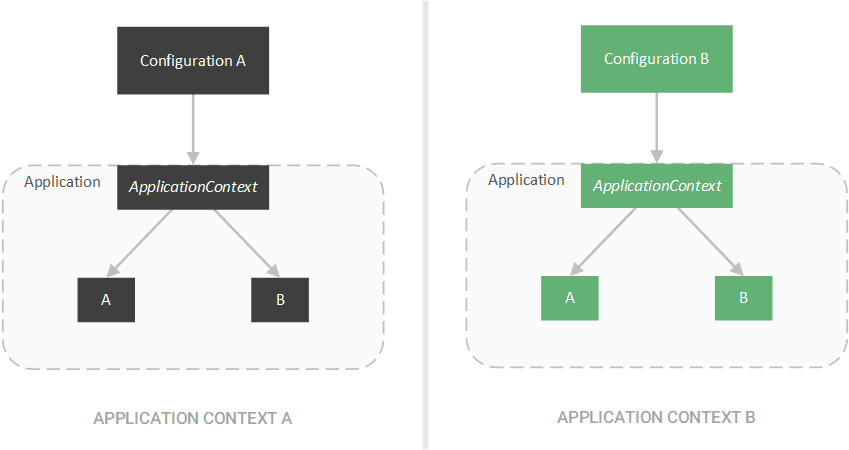
For example, we can change the AnnotationConfigApplicationContext to an XML-based configuration class, such as ClassPathXmlApplicationContext:
@Test
public void givenXmlConfiguration_whenGetPrototypeBean_thenReturnConstructedBean() {

    String expectedName = "Some name";
    ApplicationContext context = new ClassPathXmlApplicationContext("context.xml");

    // Same test as before ...
}
4. Proxy Pattern
Proxies are a handy tool in our digital world, and we use them very often outside of software (such as network proxies). In code, the proxy pattern is a technique that allows one object — the proxy — to control access to another object — the subject or service.

4.1. Transactions
To create a proxy, we create an object that implements the same interface as our subject and contains a reference to the subject.
We can then use the proxy in place of the subject.
In Spring, beans are proxied to control access to the underlying bean. We see this approach when using transactions:
@Service
public class BookManager {

    @Autowired
    private BookRepository repository;

    @Transactional
    public Book create(String author) {
        System.out.println(repository.getClass().getName());
        return repository.create(author);
    }
}
In our BookManager class, we annotate the create method with the @Transactional annotation. This annotation instructs Spring to atomically execute our create method. Without a proxy, Spring wouldn’t be able to control access to our BookRepository bean and ensure its transactional consistency.
4.2. CGLib Proxies
Instead, Spring creates a proxy that wraps our BookRepository bean and instruments our bean to execute our create method atomically.
When we call our BookManager#create method, we can see the output:
com.baeldung.patterns.proxy.BookRepository$$EnhancerBySpringCGLIB$$3dc2b55cTypically, we would expect to see a standard BookRepository object ID; instead, we see an EnhancerBySpringCGLIB object ID.
Behind the scenes, Spring has wrapped our BookRepository object inside as EnhancerBySpringCGLIB object. Spring thus controls access to our BookRepository object (ensuring transactional consistency).

Generally, Spring uses two types of proxies:
- CGLib Proxies – Used when proxying classes
- JDK Dynamic Proxies – Used when proxying interfaces
While we used transactions to expose the underlying proxies, Spring will use proxies for any scenario in which it must control access to a bean.
5. Template Method Pattern
In many frameworks, a significant portion of the code is boilerplate code.
For example, when executing a query on a database, the same series of steps must be completed:
- Establish a connection
- Execute query
- Perform cleanup
- Close the connection
These steps are an ideal scenario for the template method pattern.
5.1. Templates & Callbacks
The template method pattern is a technique that defines the steps required for some action, implementing the boilerplate steps, and leaving the customizable steps as abstract. Subclasses can then implement this abstract class and provide a concrete implementation for the missing steps.
We can create a template in the case of our database query:
public abstract DatabaseQuery {

    public void execute() {
        Connection connection = createConnection();
        executeQuery(connection);
        closeConnection(connection);
    }

    protected Connection createConnection() {
        // Connect to database...
    }

    protected void closeConnection(Connection connection) {
        // Close connection...
    }

    protected abstract void executeQuery(Connection connection);
}
Alternatively, we can provide the missing step by supplying a callback method.
A callback method is a method that allows the subject to signal to the client that some desired action has completed.
In some cases, the subject can use this callback to perform actions — such as mapping results.
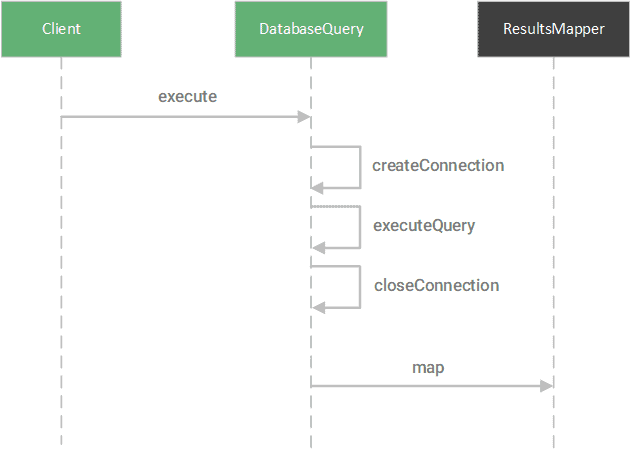
For example, instead of having an executeQuery method, we can supply the execute method a query string and a callback method to handle the results.
First, we create the callback method that takes a Results object and maps it to an object of type T:
public interface ResultsMapper<T> {
    public T map(Results results);
}
Then we change our DatabaseQuery class to utilize this callback:
public abstract DatabaseQuery {

    public <T> T execute(String query, ResultsMapper<T> mapper) {
        Connection connection = createConnection();
        Results results = executeQuery(connection, query);
        closeConnection(connection);
        return mapper.map(results);
    ]

    protected Results executeQuery(Connection connection, String query) {
        // Perform query...
    }
}
This callback mechanism is precisely the approach that Spring uses with the JdbcTemplate class.
5.2. JdbcTemplate
The JdbcTemplate class provides the query method, which accepts a query String and ResultSetExtractor object:
public class JdbcTemplate {

    public <T> T query(final String sql, final ResultSetExtractor<T> rse) throws DataAccessException {
        // Execute query...
    }

    // Other methods...
}
The ResultSetExtractor converts the ResultSet object — representing the result of the query — into a domain object of type T:
@FunctionalInterface
public interface ResultSetExtractor<T> {
    T extractData(ResultSet rs) throws SQLException, DataAccessException;
}
Spring further reduces boilerplate code by creating more specific callback interfaces.
For example, the RowMapper interface is used to convert a single row of SQL data into a domain object of type T.
@FunctionalInterface
public interface RowMapper<T> {
    T mapRow(ResultSet rs, int rowNum) throws SQLException;
}
To adapt the RowMapper interface to the expected ResultSetExtractor, Spring creates the RowMapperResultSetExtractor class:
public class JdbcTemplate {

    public <T> List<T> query(String sql, RowMapper<T> rowMapper) throws DataAccessException {
        return result(query(sql, new RowMapperResultSetExtractor<>(rowMapper)));
    }

    // Other methods...
}
Instead of providing logic for converting an entire ResultSet object, including iteration over the rows, we can provide logic for how to convert a single row:
public class BookRowMapper implements RowMapper<Book> {

    @Override
    public Book mapRow(ResultSet rs, int rowNum) throws SQLException {

        Book book = new Book();

        book.setId(rs.getLong("id"));
        book.setTitle(rs.getString("title"));
        book.setAuthor(rs.getString("author"));

        return book;
    }
}
With this converter, we can then query a database using the JdbcTemplate and map each resulting row:
JdbcTemplate template = // create template...
template.query("SELECT * FROM books", new BookRowMapper());
Apart from JDBC database management, Spring also uses templates for:
- Java Message Service (JMS)
- Java Persistence API (JPA)
- Hibernate (now deprecated)
- Transactions
6. Conclusion
In this tutorial, we looked at four of the most common design patterns applied in the Spring Framework.
We also explored how Spring utilizes these patterns to provide rich features while reducing the burden on developers.


















