


Learn through the super-clean Baeldung Pro experience:
>> Membership and Baeldung Pro.
No ads, dark-mode and 6 months free of IntelliJ Idea Ultimate to start with.
Learn through the super-clean Baeldung Pro experience:
>> Membership and Baeldung Pro.
No ads, dark-mode and 6 months free of IntelliJ Idea Ultimate to start with.
SQL joins are essential for combining data from multiple tables based on related columns. Understanding the different types of joins is crucial for querying data efficiently and accurately. In addition, each JOIN type serves a unique purpose, enabling us to tailor queries to specific data retrieval needs.
In this tutorial, we’ll cover the various types of joins in SQL, including inner joins, left joins, right joins, full outer joins, and cross joins. Further, we’ll also explore practical example use cases for each join type to illustrate their applications in real-world scenarios using the Baeldung University database schema and sample data.
JOIN is a powerful operation that enables us to combine rows from two or more tables based on a related column between them. They are fundamental in relational database systems because they enable data retrieval spread across multiple tables, providing a unified view of related information.
There are several types of joins in SQL, each designed to meet different data retrieval needs:
Let’s check the basic syntax for an SQL JOIN:
SELECT <columns list>
FROM table1
<JOIN TYPE> table2 ON table1.column = table2.column;
In this query, table1 and table2 are the names of the tables we’re joining. The ON clause specifies the condition for the join, which is usually a column common to both tables. The <column list> is the list of column names, separated by commas, to retrieve data from. The <JOIN TYPE> is a type of join being performed, such as INNER JOIN, LEFT JOIN, RIGHT JOIN, or FULL OUTER JOIN.
All SQL joins, except the cross join, follow this syntax. We’ll learn the syntax of cross join later in this tutorial.
An INNER JOIN is the most common type of join in SQL. It retrieves only the rows with matching values in both tables involved in the JOIN. Essentially, it returns rows where there is a match in both tables.
Let’s begin by performing an INNER JOIN on the Faculty and Department tables to retrieve the names of employees along with their department names:
SELECT Faculty.name, Department.name AS department_name
FROM Faculty
INNER JOIN Department ON Faculty.department_id = Department.id;
This SQL query retrieves the data from the name column of both the tables, Faculty and Department, by joining these two tables. The INNER JOIN is used to combine rows from both tables where the department_id in the Faculty table matches the id in the Department table. We used department_name as an alias for the name column in the Department table.
The result of this query is a combination of Faculty names and their corresponding Department names:
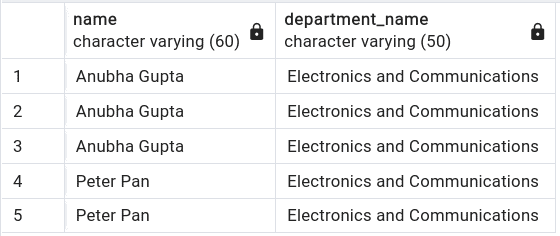
Thus, we get a combined view.
A LEFT JOIN (or LEFT OUTER JOIN) retrieves all rows from the left table and the matched rows from the right table. If there is no match, the result is NULL on the side of the right table.
Let’s perform a LEFT JOIN to retrieve all employee names with their respective department names:
SELECT Faculty.name, Department.name AS department_name
FROM Faculty
LEFT JOIN Department ON Faculty.department_id = Department.id;
In this query, we use a LEFT JOIN to include all Faculty and their Department names:

The result of this query includes all Faculty members, with their Department names if available.
A RIGHT JOIN (or RIGHT OUTER JOIN) is the opposite of a LEFT JOIN. It retrieves all rows from the right table and the matched rows from the left table. Additionally, if there is no match, the result is NULL on the side of the left table.
Let’s perform a RIGHT JOIN to retrieve all departments and the names of their employees:
SELECT Faculty.name, Department.name AS department_name
FROM Faculty
RIGHT JOIN Department ON Faculty.department_id = Department.id;
In this query, we use a RIGHT JOIN to include all Faculty members and their Department names. This query works similarly to the one we explained earlier with LEFT JOIN:
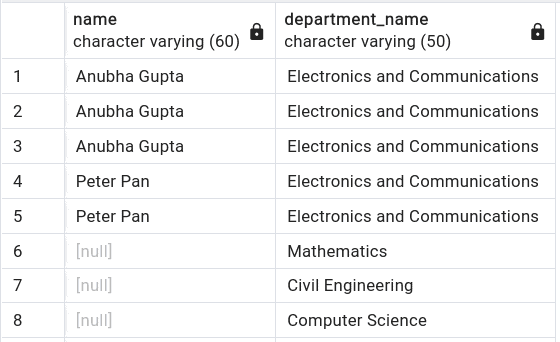
Just like the LEFT JOIN, the result of this query includes all Faculty members, with their Department names if available:
A FULL OUTER JOIN retrieves all rows when there is a match in either the left or right table. It returns NULL for non-matching rows from both tables.
For example, let’s perform a FULL OUTER JOIN to retrieve all employees and departments, even if there are no matches between them:
SELECT Faculty.name, Department.name AS department_name
FROM Faculty
FULL OUTER JOIN Department ON Faculty.department_id = Department.id;
In this query, we use a FULL OUTER JOIN to include all Faculty names and departments, regardless of whether they have matching rows in the other table.
The result set includes all Faculty and Department names:

As seen, if a Faculty member doesn’t belong to any Department, the Department name is NULL. Similarly, if a Department doesn’t have any Faculty members, the Faculty name is NULL.
A CROSS JOIN returns the cartesian product of the two tables, meaning it returns all possible combinations of rows from both tables.
The basic syntax for a CROSS JOIN is fairly simple:
SELECT columns
FROM table1
CROSS JOIN table2;
In this query, table1 and table2 are the names of the tables we’re joining. This JOIN doesn’t require an ON clause because it combines all rows from the first table with all rows from the second table, resulting in a cartesian product.
For example, let’s perform a CROSS JOIN to retrieve all combinations of employees and departments:
SELECT Faculty.name, Department.name AS department_name
FROM Faculty
CROSS JOIN Department;
This SQL query uses a CROSS JOIN to combine each row from the name column of the Faculty table with each row from the name column of the Department table:
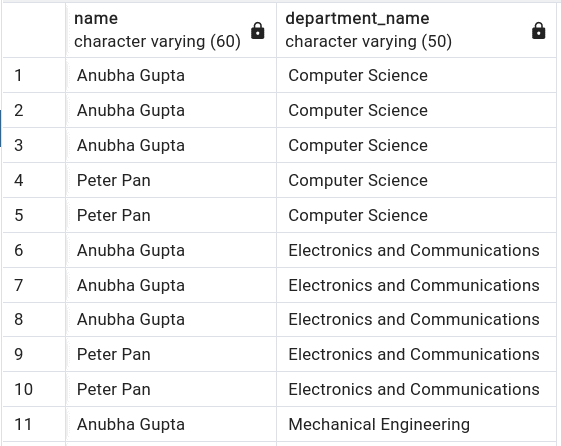
As expected, the output includes all relevant rows from both tables.
In this article, we’ve covered the different types of joins in SQL, including inner joins, left joins, right joins, full outer joins, and cross joins. Each JOIN type serves a unique purpose and enables us to retrieve data from multiple tables based on various requirements.
Furthermore, by understanding and using these JOIN types effectively, we can perform complex data retrieval operations to suit our specific needs.