


Mocking is an essential part of unit testing, and the Mockito library makes it easy to write clean and intuitive unit tests for your Java code.
Get started with mocking and improve your application tests using our Mockito guide:
Handling concurrency in an application can be a tricky process with many potential pitfalls. A solid grasp of the fundamentals will go a long way to help minimize these issues.
Get started with understanding multi-threaded applications with our Java Concurrency guide:
Spring 5 added support for reactive programming with the Spring WebFlux module, which has been improved upon ever since. Get started with the Reactor project basics and reactive programming in Spring Boot:
Since its introduction in Java 8, the Stream API has become a staple of Java development. The basic operations like iterating, filtering, mapping sequences of elements are deceptively simple to use.
But these can also be overused and fall into some common pitfalls.
To get a better understanding on how Streams work and how to combine them with other language features, check out our guide to Java Streams:
Explore Spring Boot 3 and Spring 6 in-depth through building a full REST API with the framework:
Yes, Spring Security can be complex, from the more advanced functionality within the Core to the deep OAuth support in the framework.
I built the security material as two full courses - Core and OAuth, to get practical with these more complex scenarios. We explore when and how to use each feature and code through it on the backing project.
You can explore the course here:
Spring Data JPA is a great way to handle the complexity of JPA with the powerful simplicity of Spring Boot.
Get started with Spring Data JPA through the guided reference course:
Refactor Java code safely — and automatically — with OpenRewrite.
Refactoring big codebases by hand is slow, risky, and easy to put off. That’s where OpenRewrite comes in. The open-source framework for large-scale, automated code transformations helps teams modernize safely and consistently.
Each month, the creators and maintainers of OpenRewrite at Moderne run live, hands-on training sessions — one for newcomers and one for experienced users. You’ll see how recipes work, how to apply them across projects, and how to modernize code with confidence.
Join the next session, bring your questions, and learn how to automate the kind of work that usually eats your sprint time.
Distributed systems often come with complex challenges such as service-to-service communication, state management, asynchronous messaging, security, and more.
Dapr (Distributed Application Runtime) provides a set of APIs and building blocks to address these challenges, abstracting away infrastructure so we can focus on business logic.
In this tutorial, we'll focus on Dapr's pub/sub API for message brokering. Using its Spring Boot integration, we'll simplify the creation of a loosely coupled, portable, and easily testable pub/sub messaging system:
1. Overview
Programming languages are classified based on their levels of abstraction. We differentiate high-level languages (Java, Python, JavaScript, C++, Go), low-level (Assembler), and finally, machine code.
Every high-level language code, like Java, needs to be translated to machine native code for execution. This translation process can be either compilation or interpretation. However, there is also a third option. A combination that seeks to take advantage of both approaches.
In this tutorial, we’ll explore how Java code gets compiled and executed on multiple platforms. We’ll look at some Java and JVM design specifics. These will help us determine whether Java is compiled, interpreted, or a hybrid of both.
2. Compiled vs. Interpreted
Let’s start by looking into some basic differences between compiled and interpreted programming languages.
2.1. Compiled Languages
Compiled languages (C++, Go) are converted directly into machine native code by a compiler program.
They require an explicit build step before execution. That is why we need to rebuild the program every time we make a code change.
Compiled languages tend to be faster and more efficient than interpreted languages. However, their generated machine code is platform-specific.
2.2. Interpreted Languages
On the other hand, in interpreted languages (Python, JavaScript), there are no build steps. Instead, interpreters operate on the source code of the program while executing it.
Interpreted languages were once considered significantly slower than compiled languages. However, with the development of just-in-time (JIT) compilation, the performance gap is shrinking. We should note, however, that JIT compilers turn code from the interpreted language into machine native code as the program runs.
Furthermore, we can execute interpreted language code on multiple platforms like Windows, Linux, or Mac. Interpreted code has no affinity with a particular type of CPU architecture.
3. Write Once Run Anywhere
Java and the JVM were designed with portability in mind. Therefore, most popular platforms today can run Java code.
This might sound like a hint that Java is a purely interpreted language. However, before execution, Java source code needs to be compiled into bytecode. Bytecode is a special machine language native to the JVM. The JVM interprets and executes this code at runtime.
It is the JVM that is built and customized for each platform that supports Java, rather than our programs or libraries.
Modern JVMs also have a JIT compiler. This means that the JVM optimizes our code at runtime to gain similar performance benefits to a compiled language.
4. Java Compiler
The javac command-line tool compiles Java source code into Java class files containing platform-neutral bytecode:
$ javac HelloWorld.java
Source code files have .java suffixes, while the class files containing bytecode get generated with .class suffixes.

5. Java Virtual Machine
The compiled class files (bytecode) can be executed by the Java Virtual Machine (JVM):
$ java HelloWorld

Hello Java!
Let’s now take a deeper look into the JVM architecture. Our goal is to determine how bytecode gets converted to machine native code at runtime.
5.1. Architecture Overview
The JVM is composed of five subsystems:
- ClassLoader
- JVM memory
- Execution engine
- Native method interface and
- Native method library

5.2. ClassLoader
The JVM makes use of the ClassLoader subsystems to bring the compiled class files into JVM memory.
Besides loading, the ClassLoader also performs linking and initialization. That includes:
- Verifying the bytecode for any security breaches
- Allocating memory for static variables
- Replacing symbolic memory references with the original references
- Assigning original values to static variables
- Executing all static code blocks
5.3. Execution Engine
The execution engine subsystem is in charge of reading the bytecode, converting it into machine native code, and executing it.
Three major components are in charge of execution, including both an interpreter and a compiler:
- Since the JVM is platform-neutral, it uses an interpreter to execute bytecode
- The JIT compiler improves performance by compiling bytecode to native code for repeated method calls
- The Garbage collector collects and removes all unreferenced objects
The execution engine makes use of the Native method interface (JNI) to call native libraries and applications.
5.4. Just in Time Compiler
The main disadvantage of an interpreter is that every time a method is called, it requires interpretation, which can be slower than compiled native code. Java makes use of the JIT compiler to overcome this issue.
The JIT compiler doesn’t completely replace the interpreter. The execution engine still uses it. However, the JVM uses the JIT compiler based on how frequently a method is called.
The JIT compiler compiles the entire method’s bytecode to machine native code, so it can be reused directly. As with a standard compiler, there’s the generation to intermediate code, optimization, and then the production of machine native code.
A profiler is a special component of the JIT compiler responsible for finding hotspots. The JVM decides which code to JIT compile based on the profiling information collected during runtime.
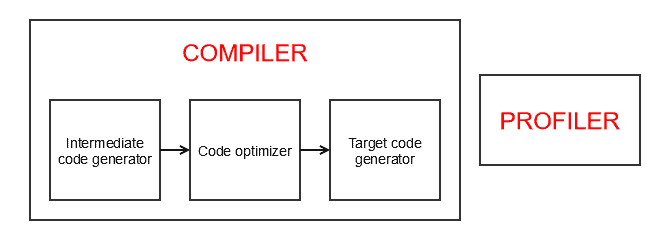
One effect of this is that a Java program can become faster at performing its job after a few cycles of execution. Once the JVM has learned the hotspots, it is able to create the native code allowing things to run faster.
6. Performance Comparison
Let’s take a look at how the JIT compilation improves Java’s runtime performance.
6.1. Fibonacci Performance Test
We’ll use a simple recursive method to calculate the n-th Fibonacci number:
private static int fibonacci(int index) {
    if (index <= 1) {
        return index;
    }
    return fibonacci(index-1) + fibonacci(index-2);
}
In order to measure performance benefits for repeated method calls, we’ll run the Fibonacci method 100 times:
for (int i = 0; i < 100; i++) {
    long startTime = System.nanoTime();
    int result = fibonacci(12);
    long totalTime = System.nanoTime() - startTime;
    System.out.println(totalTime);
}
First, we’ll compile and execute the Java code normally:
$ java Fibonacci.java
Then, we’ll execute the same code with the JIT compiler disabled:
$ java -Djava.compiler=NONE Fibonacci.java
Finally, we’ll implement and run the same algorithm in C++ and JavaScript for comparison.
6.2. Performance Test Results
Let’s take a look at the measured average performances in nanoseconds after running the Fibonacci recursive test:
- Java using JIT compiler – 2726 ns – fastest
- Java without JIT compiler – 17965 ns – 559% slower
- C++ without O2 optimization – 9435 ns – 246% slower
- C++ with O2 optimization – 3639 ns – 33% slower
- JavaScript – 22998 ns – 743% slower
In this example, Java’s performance is more than 500% better using the JIT compiler. However, it does take a few runs for the JIT compiler to kick-in.
Interestingly, Java performed 33% better than C++ code, even when C++ is compiled with the O2 optimization flag enabled. As expected, C++ performed much better in the first few runs, when Java was still interpreted.
Java also outperformed the equivalent JavaScript code run with Node, which also uses a JIT compiler. Results show more than 700% better performance. The main reason is that Java’s JIT compiler kicks-in much faster.
7. Things to Consider
Technically, it’s possible to compile any static programming language code to machine code directly. It’s also possible to interpret any programming code step-by-step.
Similar to many other modern programming languages, Java uses a combination of a compiler and interpreter. The goal is to make use of the best of both worlds, enabling high performance and platform-neutral execution.
In this article, we focused on explaining how things work in HotSpot. HotSpot is the default open-source JVM implementation by Oracle. Graal VM is also based on HotSpot, so the same principles apply.
Most popular JVM implementations nowadays use a combination of an interpreter and a JIT compiler. However, it’s possible that some of them use a different approach.
8. Conclusion
In this article, we looked into Java and the JVM internals. Our goal was to determine if Java is a compiled or interpreted language. We explored the Java compiler and the JVM execution engine internals.
Based on that, we concluded that Java uses a combination of both approaches.
The source code we write in Java is first compiled into bytecode during the build process. The JVM then interprets the generated bytecode for execution. However, the JVM also makes use of a JIT compiler during runtime to improve performances.


















